This is a comprehensive database of current rogue security applications, adware, spyware, Trojan horses, worms and other malicious software. All threats and risks are listed in alphabetical order. Click on a specific security threat name in our database to learn more about it, i.e., malware type, damage potential, description and removal instructions.
A
Antivirus Protection Trial
Antimalware Tool
Android.Zeahache
Android.Rootcager
Antivirus Monitor
AntiVirus AntiSpyware 2011
AntiMalware GO
AntiVira Av
AVG Antivirus 2011 (Fake)
Antivirus .NET
AntiVirus System 2011
Antivirus Scan
AntiVirus Solution 2010
Antivirus Action
Antivirus Studio 2010
Antimalware Doctor Protection Center
Antivirus8
Antivirus IS
AndroidOS.FakePlayer
AWM Antivirus
AVDefender 2011
Advanced Security Tool 2010
Ad.yieldmanager.com
Antivirus (AnVi)
Attention! Your web page request has been cancelled.
ATTENTION! SPYWARE ALERT
Antivir Solution Pro
AntivirusGT
AV Security Suite
A-fast Antivirus
AKM Antivirus 2010
AP Manager
Antispyware Soft
Antivirus Suite
Antivirus 7
Antivirus 2010
Antivir 2010
Antimalware Doctor
Advanced Defender
Antimalware Defender
Antivirus Soft
APcSafe
ArmorDefender
Antivirus Live
Antivirus Clean 2011
Antivirus Center
Apple security center
Antivirus Pro
Android.Lightdd
Android.Tonclank
Anti-Malware Lab
Avast ENHANCED PROTECTION MODE
Android.Golddream
Android.Smssniffer
Android.Hippo
Advanced PC Shield 2012
AV Guard Online
AV Protection Online
Ask Search and Ask Toolbar
Antivirus XP Hard Disk Repair v9
AV Security 2012
AV Protection 2011
Achtung!!! Ein Vorgang illegaler Aktivitaten wurde erkannt.
Antivirii 2011
Audio ads virus
Antivirus Smart Protection and Malware Protection Center
AV Security Essentials
Antivirus Protection 2012
Advanced Antispyware Solution
B
Best Malware Protection
W32.Blaster.Worm
BitDefender 2011
BUNDESPOLIZEI Achtung!
BlueFlare Antivirus
Bandoo
Bigseekpro.com/Somoto.com
Babylon Toolbar
Backdoor:Win32/IRCbot
BasicScan
Best Virus Protection
Backdoor.Multi.Zaccess.gen
C
Critical Hard Disk Drive Error
CleanThis
Clickpotato
Check Disk
Copyright Violation: Copyrighted Content Detected
Control Center
CleanUp Antivirus
Coupon Alert Toolbar
СИСТЕМНЫЙ АНТИВИРУС MICROSOFT 2011
Chit Chat
Cloud Protection
Cloud AV 2012
D
Disk Helper
Disk Optimizer
Disk OK
Disk Repair
Defragmenter
Disk Doctor
Defence Center
Defense Center
Data Protection
Digital Protection
Dr. Guard
Desktop Security 2010
DefendAPc
Die offizielle Mitteilung des Bundeskriminalamtes
Data Recovery
DNS Changer
E
E-Set Antivirus 2011 (Fake)
Easy Scan
Earth Antivirus
EZLife
Essential Cleaner
EoRezo
F
Fast Windows Antivirus 2011
Fast Disk
Full Scan
Facemoods
Findxplorer
FREEzeFrog
Find-fast-answers.com
Files indexation process failed
Foodpuma.com
FakeVimes
G
Good Memory
Google Redirect Virus
Ghost Antivirus
Guard Pro
Goingonearth.com
Guard Online
Get-answers-fast.com
Guardia di Finanza
H
HDD Fix
HDD Low
HDD Doctor
HDD Tools
HDD Rescue
HDD Plus
HDD Diagnostic
Hard Drive Diagnostic
HDD Scan
HDD Control
HDD Defragmenter
Home Safety Essentials
Hello4/Blank Window2
HDD Repair
Home Security Solutions
Happili
I
Internet Protection
Internet Defender
Internet Security Essentials
Internet Security 2011
Internet Antivirus 2011
Internet Security Suite
IronDefense
IronDefender
INFILTRATION ALERT Win32/Nuqel.E
Identity theft attempt detected
InSysSecure
Internet Security 2010
iMesh Toolbar
Internet Security Guard
Internet Security 2012
I Want This!
J
Jucheck.exe
K
Koobface
L
Live Security Suite
Live Enterprise Suite
La policía ESPAÑOLA
Las operaciones sobre las actividades ilegales se detectaron en el ordenador
M
MS Removal Tool
Mega Antivirus 2012
McAVG 2011
My Disk
Memory Fixer
Microsoft Security Antivirus ransomware
Media Access threat has been detected
Malware Destructor 2011
Microsoft Windows Malicious Software Removal Tool (Fake)
My Security Shield
My Security Engine
MyWebSearch
My Security Wall
Malware Defense
MACDefender
Mac Security
Mac Protector
Malware Protection
Mac Guard
Milestone Antivirus
METROPOLITAN POLICE
Master Utilities
Msdcsc.exe
N
Noexe.exe ransomware
Worm.Win32.Netsky
No Malware
O
Online Protection Tool
Win32/Olmarik
OpenCloud Antivirus
OpenCloud Security
P
PC Security 2011
Palladium Pro
Protect Shield
Personal Internet Security 2011
Personal Security Sentinel
PC Protection Center
Privacy Corrector
PCoptimizer 2010
Privacy Guard 2010
Protection Center
Personal Anti Malware Center
Personal Anti Malware
Paladin Antivirus
Personal Security
PC Security Guardian
Personal Shield Pro
PC Repair
Privacy Protection
POLITIE, Onwettige activiteiten gedetecteerd!!!
Ping.exe
PUP.CNET.Adware.Bundle
PRS for Music
Q
Quick Defrag
Quick Defragmenter
R
Relevant Knowledge
RegistryClever
RST Antivirus 2010
Resulturl
RiskTool.Win32.BitCoinMiner
S
System Cleaner
System Defender
Security Defender
Smart Internet Protection 2011
Adware.StartPage
Smart HDD
Security Shield
Scan Disk
Security Inspector 2010
Security Essentials 2011
Smart Defragmenter
Spyware Protection 2010
System Tool
System Defragmenter
Smart Engine
SP Center
Security Suite
Security Master AV
svchost.exe has encountered a problem and needs to close
Security breach!
Security Guard
Smart Security
Security Tool Firewall Alert
Security Central
Security Essentials 2010
Security Antivirus
SWP2009 Demo
Security Tool
System plugin at address 0x00874324 got critical error
System process at address 0xE4783995 have just crashed
Security Shield Pro 2011
Security Center
Security Solution 2011
ScanQuery
Security Essentials Ultimate Pack
Security Protection
ShopperReports
System process at address 0x3BC3 have just crashed
System Repair
Scour
SocialSkinz
Surveyprizecenter.com
System Recovery
Seeearch.com
Startsear.ch
Security Sphere 2012
Security Guard 2012
System Restore
System Security 2011
System Security 2012
System Fix
Security Monitor 2012
System Check
Strathclyde Police
Search.conduit.com
Smart Protection 2012
Security Scanner
Smart Fortress 2012
Searchnu
T
Trojan.Ransomware
ThinkPoint
The fake Microsoft Security Essentials Alert
Tango Toolbar
TDSS
Trojan.FakeAlert
Trojan-BNK.Win32.Keylogger.gen
TR/VB.Agent.20480.A
Trojan-BNK.Win32.Keylogger.gen
Total Protect
Trojan.MBRlock
Trojan.Ramage
Theworld.exe
Tidserv Activity 2
Temp:winupd.exe
Trojan.Tracur
Total Anti Malware Protection
U
Ultra Defragger
User Protection
Update your browser
Us-srch-system.com
V
Vista Antispyware 2011
Video ActiveX Object Error
Vir'O'Fire
Virus Protector
Vista Antispyware 2010
Vista Antispyware 2012, Win 7 Internet Security 2012, Win 7 Security 2012
Volmgr.exe, volmgr.dll: Trojan.Plongo
W
Windows license locked!
WhiteSmoke Translator
Windows Problems Remover
Windows Antispyware Solution
Windows Risk Eliminator
Windows Universal Tool
Windows Scan
Windows Utility Tool
Windows Security & Control
Windows Optimization & Security
Windows System Optimizator
Win Scanner
Windows Optimization Center
Win Defragmenter
Win Defrag
Win HDD
Win64.BIT.Looker.exe
Windows Defence
Win7 AV
Wireshark Antivirus
Windows activation ransomware
Windows Performance Center
WARNING WINDOWS SECURITY CENTER
Win Security 360
Windows Recovery
Windows Security Alert
Warning! Spyware detected on your computer!
Windows Oversight Center
Windows Supervision Center
Windows Attention Utility
Windows XP Recovery
Windows Tasks Optimizer
Windows XP Restore
Windows XP Repair
Windows XP Fix
Wolfram Antivirus
Webplains.net
Windows заблокирован!
Webplayersearch.com and search.webplayer.tv
Wmupdate.exe
Winxn.exe
Windows Protection Master
Windows Smart Warden
Windows Secure Kit 2011
Windows Basic Antivirus
Windows Secure Kit 2012
Windows Antivirus 2012
X
XP Antispyware 2011
XJR Antivirus
XP Internet Security 2010
XP Antispyware 2012, XP Internet Security 2012, XP Security 2012
Y
You have committed network crime!
Your Protection
Your PC Protector
Your Windows has been blocked
Your codec version is too old
Your computer is infected with Spyware!
YXH-youtube_player.xpi and YXH-youtube_player.crx
Youtube PREMIUM Player
Z
Zwunzi
Zentom System Guard
ZeroAccess/Sirefef/MAX++
0-9
100ksearches.com
404 Not Found nginx
*dayoftheweek.com
Sunday, 10 April 2011

Saturday, 9 April 2011
Remove Internet Protection (Uninstall Guide)
Internet Protection is a rogue security program that displays fake security alerts every minute or so and reports non-existent infections to make you think that your computer is infected with viruses, spyware, Trojan horses and other malicious software. It blocks other applications and automatically closes whatever you are working on. This is clearly another attempt to trick Internet users into paying for absolutely useless program. Do not purchase Internet Protection 2011; otherwise you will subjected to monetary theft, or in a worst-case example, ID Theft. There is no guarantee that your credit card details aren't going to be sold to other third parties. We are currently investigating this threat and will post more information as it becomes available.
Update: It seems that Internet Protection is a clone of Internet Defender. For more information, please read how to remove Internet Defender.

Internet Protection removal instructions (in Safe Mode with Networking):
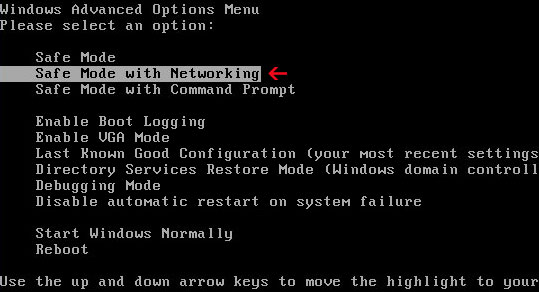
1. Reboot your computer is "Safe Mode with Networking". As the computer is booting tap the "F8 key" continuously which should bring up the "Windows Advanced Options Menu" as shown below. Use your arrow keys to move to "Safe Mode with Networking" and press Enter key. Login as the same user you were previously logged in with in the normal Windows mode. Read more detailed instructions here: http://www.computerhope.com/issues/chsafe.htm
2. Download free anti-malware software from the list below and run a full system scan.
NOTE: in some cases the rogue program may block anti-malware software. Before saving the selected program onto your computer, you may have to rename the installer to iexplore.exe or winlogon.exe With all of these tools, if running Windows 7 or Vista they MUST be run as administrator. Launch the program and follow the prompts. Don't forget to update the installed program before scanning.
3. New threats appear every day. In order to protect your PC from such (new) infections we strongly recommend you to use ESET Smart Security.
Alternate Internet Protection removal instructions:
1. Download iexplore.exe (NOTE: iexplore.exe file is renamed HijackThis tool from TrendMicro).
Launch the iexplore.exe and click "Do a system scan only" button.
If you can't open iexplore.exe file then download explorer.scr and run it.
2. Search for such entry in the scan results (Windows XP):
O4 - HKLM\..\Run: [SET OF RANDOM CHARACTERS] "C:\WINDOWS\system32\rundll32.exe" "C:\Documents and Settings\All Users\Application Data\[SET OF RANDOM CHARACTERS].dat", DllUnregisterServer
O4 - Startup: [SET OF RANDOM CHARACTERS].lnk = C:\WINDOWS\system32\rundll32.exe
Select all similar entries and click once on the "Fix checked" button. Close HijackThis tool.
3. Download free anti-malware software from the list below and run a full system scan.
NOTE: in some cases the rogue program may block anti-malware software. Before saving the selected program onto your computer, you may have to rename the installer to iexplore.exe or winlogon.exe. With all of these tools, if running Windows 7 or Vista they MUST be run as administrator. Launch the program and follow the prompts. Don't forget to update the installed program before scanning.
4. New threats appear every day. In order to protect your PC from such (new) infections we strongly recommend you to use ESET Smart Security.
Associated Internet Protection files and registry values:
Files:
Windows XP
Update: It seems that Internet Protection is a clone of Internet Defender. For more information, please read how to remove Internet Defender.
Internet Protection removal instructions (in Safe Mode with Networking):
1. Reboot your computer is "Safe Mode with Networking". As the computer is booting tap the "F8 key" continuously which should bring up the "Windows Advanced Options Menu" as shown below. Use your arrow keys to move to "Safe Mode with Networking" and press Enter key. Login as the same user you were previously logged in with in the normal Windows mode. Read more detailed instructions here: http://www.computerhope.com/issues/chsafe.htm
2. Download free anti-malware software from the list below and run a full system scan.
NOTE: in some cases the rogue program may block anti-malware software. Before saving the selected program onto your computer, you may have to rename the installer to iexplore.exe or winlogon.exe With all of these tools, if running Windows 7 or Vista they MUST be run as administrator. Launch the program and follow the prompts. Don't forget to update the installed program before scanning.
3. New threats appear every day. In order to protect your PC from such (new) infections we strongly recommend you to use ESET Smart Security.
Alternate Internet Protection removal instructions:
1. Download iexplore.exe (NOTE: iexplore.exe file is renamed HijackThis tool from TrendMicro).
Launch the iexplore.exe and click "Do a system scan only" button.
If you can't open iexplore.exe file then download explorer.scr and run it.
2. Search for such entry in the scan results (Windows XP):
O4 - HKLM\..\Run: [SET OF RANDOM CHARACTERS] "C:\WINDOWS\system32\rundll32.exe" "C:\Documents and Settings\All Users\Application Data\[SET OF RANDOM CHARACTERS].dat", DllUnregisterServer
O4 - Startup: [SET OF RANDOM CHARACTERS].lnk = C:\WINDOWS\system32\rundll32.exe
Select all similar entries and click once on the "Fix checked" button. Close HijackThis tool.
3. Download free anti-malware software from the list below and run a full system scan.
NOTE: in some cases the rogue program may block anti-malware software. Before saving the selected program onto your computer, you may have to rename the installer to iexplore.exe or winlogon.exe. With all of these tools, if running Windows 7 or Vista they MUST be run as administrator. Launch the program and follow the prompts. Don't forget to update the installed program before scanning.
4. New threats appear every day. In order to protect your PC from such (new) infections we strongly recommend you to use ESET Smart Security.
Associated Internet Protection files and registry values:
Files:
Windows XP
- C:\Documents and Settings\All Users\Application Data\[SET OF RANDOM CHARACTERS]_.dat
- C:\Program Files\Internet Protection
- C:\Program Files\Internet Protection\Internet Protection.dll
- C:\Documents and Settings\[UserName]\Local Settings\Temp\[SET OF RANDOM CHARACTERS].dll
- C:\ProgramData\[SET OF RANDOM CHARACTERS]_.dat
- C:\Program Files\Internet Protection
- C:\Program Files\Internet Protection\Internet Protection.dll
- C:\Users\[UserName]\AppData\Local\Temp\[SET OF RANDOM CHARACTERS].dll
- HKEY_CURRENT_USER\Software\Microsoft\Windows\CurrentVersion\Run "[SET OF RANDOM CHARACTERS]"
- HKEY_LOCAL_MACHINE\SOFTWARE\Microsoft\Windows\CurrentVersion\Run "[SET OF RANDOM CHARACTERS]"
Remove Relevant Knowledge (Uninstall Guide)
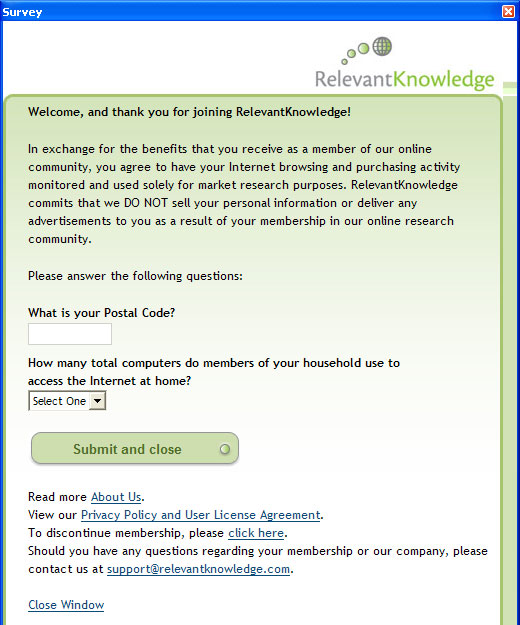
Relevant Knowledge is classified as spyware or adware by some of the anti-virus software vendors, e.g. Symantec, McAfee, CA, BitDefender, F-Secure and some others. Detections: Spyware.Marketscore, Proxy-OSS, Adware.Relevant.0961. Relevant Knowledge monitors browsing habits and purchasing activities. The data collected is sent to the creator of the application or third-parties. It displays surveys in a pop-up window. Relevant Knowledge uses Internet connection in the background without a user's knowledge and in some cases may even affect Internet connection speed because your Internet connections will go through its own proxy. RelevantKnowledge is bundled in many freeware and commercial applications and it is introduced to a user when those commercial or free products are installed. It could be Windows screensavers, themes, games, etc. That's why you should read user agreement very carefully before installing such applications; otherwise you may install Relevant Knowledge or similar spyware/adware without even realizing it. If you recently noticed a Relevant Knowledge icon on your computer task bar which is a gray circle with lines running through it like latitude and longitude lines on a rounded surface and rlvknlg.exe in your process list then your computer is infected with Relevant Knowledge. To remove it from your computer, please follow the removal instructions below. Leave a comment bellow if you have any questions or additional information about Relevant Knowledge. Good luck and be safe online!
Relevant Knowledge icon:

Relevant Knowledge survey:
Relevant Knowledge removal instructions:
1. First of all, download recommended anti-malware software and run a full system scan. It will detect and remove this infection from your computer. You may then follow the manual removal instructions below to remove the leftover traces of this browser hijacker. Hopefully you won't have to do that.

2. Go to the Start Menu. Select Control Panel → Add/Remove Programs.
If you are using Windows Vista or Windows 7, select Control Panel → Uninstall a Program.
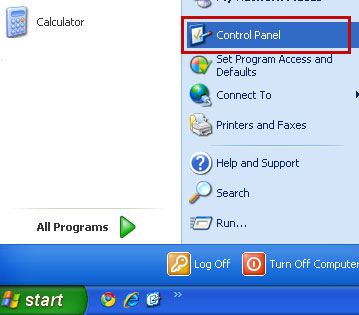
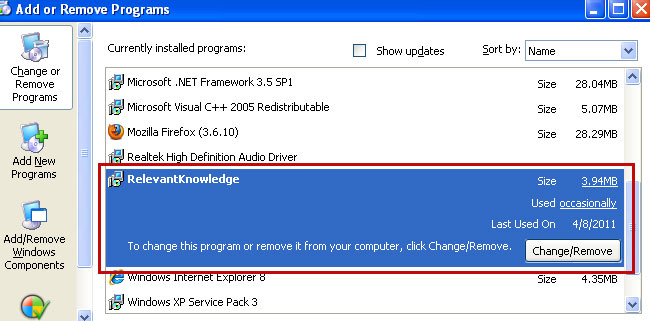
3. Search for Relevant Knowledge in the list. Select the program and click Change/Remove button.
If you are using Windows Vista/7, click Uninstall up near the top of that window.
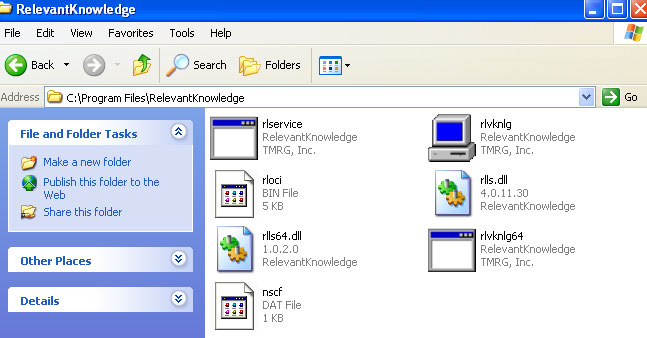
4. Restart your computer. Relevant Knowledge should be gone. If it's still on your computer, please end RelevantKnowledge's process using Task Manager (rlvknlg.exe) and delete files from C:\Program Files\RelevantKnowledge\ folder manually.
It's possible that an infection is blocking anti-malware software from properly installing. Before saving the selected program onto your computer, you may have to rename the installer to iexplore.exe or winlogon.exe. Don't forget to update the installed program before scanning.
Associated Relevant Knowledge files and registry values:
Files:
Relevant Knowledge icon:
Relevant Knowledge survey:
Relevant Knowledge removal instructions:
1. First of all, download recommended anti-malware software and run a full system scan. It will detect and remove this infection from your computer. You may then follow the manual removal instructions below to remove the leftover traces of this browser hijacker. Hopefully you won't have to do that.
2. Go to the Start Menu. Select Control Panel → Add/Remove Programs.
If you are using Windows Vista or Windows 7, select Control Panel → Uninstall a Program.
3. Search for Relevant Knowledge in the list. Select the program and click Change/Remove button.
If you are using Windows Vista/7, click Uninstall up near the top of that window.
4. Restart your computer. Relevant Knowledge should be gone. If it's still on your computer, please end RelevantKnowledge's process using Task Manager (rlvknlg.exe) and delete files from C:\Program Files\RelevantKnowledge\ folder manually.
It's possible that an infection is blocking anti-malware software from properly installing. Before saving the selected program onto your computer, you may have to rename the installer to iexplore.exe or winlogon.exe. Don't forget to update the installed program before scanning.
Associated Relevant Knowledge files and registry values:
Files:
- C:\Program Files\RelevantKnowledge\nscf.dat
- C:\Program Files\RelevantKnowledge\rlls64.dll
- C:\Program Files\RelevantKnowledge\rlls.dll
- C:\Program Files\RelevantKnowledge\rloci.bin
- C:\Program Files\RelevantKnowledge\rlservice.exe
- C:\Program Files\RelevantKnowledge\rlvknlg64.exe
- C:\Program Files\RelevantKnowledge\rlvknlg.exe
- HKEY_CURRENT_USER\Software\Microsoft\Windows\CurrentVersion\Explorer\MenuOrder\Start Menu\Programs\RelevantKnowledge
- HKEY_LOCAL_MACHINE\SOFTWARE\Microsoft\Windows\CurrentVersion\Run "RelevantKnowledge"
- HKEY_CURRENT_USER\Software\Microsoft\Windows\CurrentVersion\RunOnce "OSSProxy" rlvknlg.exe
- HKEY_CURRENT_USER\Software\Microsoft\Windows\ShellNoRoam\MUICache Data "RelevantKnowledge"
- HKEY_LOCAL_MACHINE\SOFTWARE\Microsoft\Windows\CurrentVersion\Uninstall\{d08d9f98-1c78-4704-87e6-368b0023d831}
- HKEY_LOCAL_MACHINE\SYSTEM\ControlSet001\Services\SharedAccess\Parameters\FirewallPolicy\StandardProfile\AuthorizedApplications\List "c:\program files\relevantknowledge\rlvknlg.exe:*:Enabled:rlvknlg.exe"
Thursday, 7 April 2011
Remove Fast Windows Antivirus 2011 (Uninstall Guide)
We've seen a significant increase in the number of misleading sub domains in .co.cc TLD that were promoting malware called Fast Windows Antivirus 2011. We usually classify such misleading websites as browser hijackers that pretend to scan your computer for malicious software and reports hundreds of false system security threats. They distribute malware and at least for the last few weeks they were hosting fake anti-virus application called Ms Removal Tool (BestAntivirus2011.exe). If you somehow ended up with this rogue anti-virus, please follow the Ms Removal Tool removal instructions. Although, these browser hijackers or fake scanners are titled "Fast Windows Antivirus 2011", we haven't found any rogue security program with such name yet. Most likely, Fast Windows Antivirus 2011 is only used for marketing of other malware. Anyway, if a window titled Fast Windows Antivirus 2011 pop-ups on your computer screen and supposedly scans your computer then it's certainly a scam. Do not download anything from such misleading scanners as shown in the image below. If you think that your computer has been infected some sort of malware, please run a full system scan with anti-malware software. Good luck and be safe online!
Here's an example of a fake anti-malware scanner tha reports non-existent infections on your computer.

Here's an example of a fake anti-malware scanner tha reports non-existent infections on your computer.
Wednesday, 6 April 2011
Remove Protection-soft24.com, Aviraprotect.com (Uninstall Guide)
Protection-soft24.com and aviraprotect.com are misleading websites that promote the rogue anti-virus application called Antivirus Protection or Antivirus Protection Trial. You probably wouldn't go to any of these two websites knowingly and if you are being redirected to protection-soft24.com or aviraprotect.com then there is a good change that your PC is infected with the Antivirus Protection malware or a Trojan horse that distributes this fake AV. One way or another, you should scan your computer with legitimate anti-malware software. For more information please read how to remove Antivirus Protection Trial. We recommend the malware removal applications listed below, but you can use any other anti-malware application as well, just make sure that it's legitimate. Good luck and be safe online!
Here's a screenshot of what the protection-soft24.com and aviraprotect.com look like:


Share the knowledge:
Here's a screenshot of what the protection-soft24.com and aviraprotect.com look like:
Share the knowledge:
How to Remove Antivirus Protection Trial (Uninstall Guide)
Antivirus Protection Trial is a rogue anti-virus application that reports non-existent infections on your computer. This scareware pretends to scan your computer and find files that are infected, but of course, it's all a lie. It also gives you loads of fake security alerts. The rogue application blocks you from running malware removal tools. Antivirus Protection hijacks web browsers and changes LAN settings and configures your computer to use a proxy server that displays a fake security warning instead of requested website. The rogue program may also randomly open web pages containing explicit/adult content. You are only allowed to go to the Antivirus Protection website to buy their software to remove the threats which do not even exist. Those websites are protection-soft24.com and aviraprotect.com but there might be more.

Antivirus Protection Trial will hijack your web browsers and display fake security warnings. Here's a screenshot of what the fake Internet Explorer warning looks like:

It will also display fake security warnings and alerts every one minute or so. Just like this one which states that your computer is being attacked from a remote machine:

Other fake security alerts:


Here's a screenshot of what the protection-soft24.com (payment page) looks like:
Pretty much the same happens if your computer is infected with another rogue application called Antivirus Monitor. From the HijackThis log we were able to identify the malicious files and changes made to the system. HijackThis log entries related to the Antivirus Protection Trial scareware:
R1 - HKCU\Software\Microsoft\Windows\CurrentVersion\Internet Settings,ProxyServer = http=127.0.0.1:47392
O4 - HKCU\..\Run: [qwhrpdrs] "C:\DOCUME~1\MICHAEL~1\LOCALS~1\Temp\hqwprhsrt\bsqperhder.exe"

As you can see, Antivirus Protection Trial resides in Windows %Temp% folder. It's a randomly named file. Please do not pay for Antivirus Protection Trial. Be advised, if you pay for this phony security software, you will subjected to monetary theft, or in a worst-case example, ID Theft. There is no guarantee that your credit card details aren't going to be sold to other third parties. If you have any further questions, please leave a comment. To remove Antivirus Protection Trial from your computer, please follow the steps in the removal guide below. Good luck and be safe online!
Antivirus Protection Trial removal instructions (in Safe Mode with Networking):
1. Reboot your computer is "Safe Mode with Networking". As the computer is booting tap the "F8 key" continuously which should bring up the "Windows Advanced Options Menu" as shown below. Use your arrow keys to move to "Safe Mode with Networking" and press Enter key. Login as the same user you were previously logged in with in the normal Windows mode. Read more detailed instructions here: http://www.computerhope.com/issues/chsafe.htm
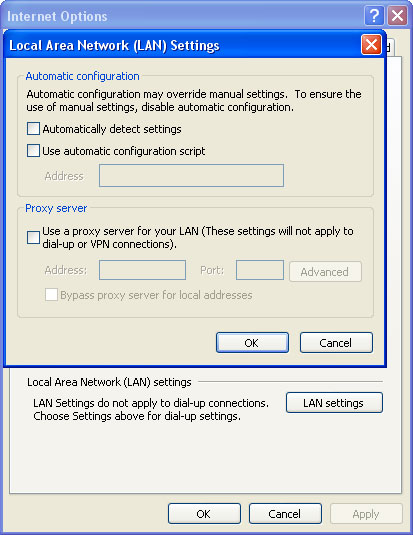
2. Launch Internet Explorer. In Internet Explorer go to: Tools->Internet Options->Connections tab. Click Lan Settings button and uncheck the checkbox labeled Use a proxy server for your LAN. Click OK.
3. Download free anti-malware software from the list below and run a full system scan.
NOTE: in some cases the rogue program may block anti-malware software. Before saving the selected program onto your computer, you may have to rename the installer to iexplore.exe, explorer.exe or winlogon.exe. With all of these tools, if running Windows 7 or Vista they MUST be run as administrator. Launch the program and follow the prompts. Don't forget to update the installed program before scanning.
4. New threats appear every day. In order to protect your PC from such (new) infections we strongly recommend you to use ESET Smart Security.
Alternate Antivirus Protection Trial removal instructions (in Normal mode):
1. Download iexplore.exe (NOTE: iexplore.exe file is renamed HijackThis tool from TrendMicro).
Launch the iexplore.exe and click "Do a system scan only" button.
If you can't open iexplore.exe file then download explorer.scr and run it.
2. Search for such entry in the scan results:
R1 - HKCU\Software\Microsoft\Windows\CurrentVersion\Internet Settings,ProxyServer = http=127.0.0.1:47392
O4 - HKCU\..\Run: [SET OF RANDOM CHARACTERS] %Temp%\[SET OF RANDOM CHARACTERS]\[SET OF RANDOM CHARACTERS].exe e.g. bsqperhder.exe
Select all similar entries and click once on the "Fix checked" button. Close HijackThis tool.
OR you can download Process Explorer and end Antivirus Protection Trial process:
NOTE: in some cases the rogue program may block anti-malware software. Before saving the selected program onto your computer, you may have to rename the installer to iexplore.exe, explorer.exe or winlogon.exe. With all of these tools, if running Windows 7 or Vista they MUST be run as administrator. Launch the program and follow the prompts. Don't forget to update the installed program before scanning.
4. New threats appear every day. In order to protect your PC from such (new) infections we strongly recommend you to use ESET Smart Security.
Associated Antivirus Protection Trial files and registry values:
Files:

%Temp% refers to:
C:\Documents and Settings\[UserName]\Local Settings\Temp (in Windows 2000/XP)
C:\Users\[UserName]\AppData\Local\Temp (in Windows Vista & Windows 7)
Registry values:
Antivirus Protection Trial will hijack your web browsers and display fake security warnings. Here's a screenshot of what the fake Internet Explorer warning looks like:
It will also display fake security warnings and alerts every one minute or so. Just like this one which states that your computer is being attacked from a remote machine:
Other fake security alerts:
Here's a screenshot of what the protection-soft24.com (payment page) looks like:
Pretty much the same happens if your computer is infected with another rogue application called Antivirus Monitor. From the HijackThis log we were able to identify the malicious files and changes made to the system. HijackThis log entries related to the Antivirus Protection Trial scareware:
R1 - HKCU\Software\Microsoft\Windows\CurrentVersion\Internet Settings,ProxyServer = http=127.0.0.1:47392
O4 - HKCU\..\Run: [qwhrpdrs] "C:\DOCUME~1\MICHAEL~1\LOCALS~1\Temp\hqwprhsrt\bsqperhder.exe"
As you can see, Antivirus Protection Trial resides in Windows %Temp% folder. It's a randomly named file. Please do not pay for Antivirus Protection Trial. Be advised, if you pay for this phony security software, you will subjected to monetary theft, or in a worst-case example, ID Theft. There is no guarantee that your credit card details aren't going to be sold to other third parties. If you have any further questions, please leave a comment. To remove Antivirus Protection Trial from your computer, please follow the steps in the removal guide below. Good luck and be safe online!
Antivirus Protection Trial removal instructions (in Safe Mode with Networking):
1. Reboot your computer is "Safe Mode with Networking". As the computer is booting tap the "F8 key" continuously which should bring up the "Windows Advanced Options Menu" as shown below. Use your arrow keys to move to "Safe Mode with Networking" and press Enter key. Login as the same user you were previously logged in with in the normal Windows mode. Read more detailed instructions here: http://www.computerhope.com/issues/chsafe.htm
2. Launch Internet Explorer. In Internet Explorer go to: Tools->Internet Options->Connections tab. Click Lan Settings button and uncheck the checkbox labeled Use a proxy server for your LAN. Click OK.
3. Download free anti-malware software from the list below and run a full system scan.
NOTE: in some cases the rogue program may block anti-malware software. Before saving the selected program onto your computer, you may have to rename the installer to iexplore.exe, explorer.exe or winlogon.exe. With all of these tools, if running Windows 7 or Vista they MUST be run as administrator. Launch the program and follow the prompts. Don't forget to update the installed program before scanning.
4. New threats appear every day. In order to protect your PC from such (new) infections we strongly recommend you to use ESET Smart Security.
Alternate Antivirus Protection Trial removal instructions (in Normal mode):
1. Download iexplore.exe (NOTE: iexplore.exe file is renamed HijackThis tool from TrendMicro).
Launch the iexplore.exe and click "Do a system scan only" button.
If you can't open iexplore.exe file then download explorer.scr and run it.
2. Search for such entry in the scan results:
R1 - HKCU\Software\Microsoft\Windows\CurrentVersion\Internet Settings,ProxyServer = http=127.0.0.1:47392
O4 - HKCU\..\Run: [SET OF RANDOM CHARACTERS] %Temp%\[SET OF RANDOM CHARACTERS]\[SET OF RANDOM CHARACTERS].exe e.g. bsqperhder.exe
Select all similar entries and click once on the "Fix checked" button. Close HijackThis tool.
OR you can download Process Explorer and end Antivirus Protection Trial process:
- [SET OF RANDOM CHARACTERS].exe, e.g. bsqperhder.exe
NOTE: in some cases the rogue program may block anti-malware software. Before saving the selected program onto your computer, you may have to rename the installer to iexplore.exe, explorer.exe or winlogon.exe. With all of these tools, if running Windows 7 or Vista they MUST be run as administrator. Launch the program and follow the prompts. Don't forget to update the installed program before scanning.
4. New threats appear every day. In order to protect your PC from such (new) infections we strongly recommend you to use ESET Smart Security.
Associated Antivirus Protection Trial files and registry values:
Files:
- %Temp%\[SET OF RANDOM CHARACTERS]\
- %Temp%\[SET OF RANDOM CHARACTERS]\[SET OF RANDOM CHARACTERS].exe
%Temp% refers to:
C:\Documents and Settings\[UserName]\Local Settings\Temp (in Windows 2000/XP)
C:\Users\[UserName]\AppData\Local\Temp (in Windows Vista & Windows 7)
Registry values:
- HKEY_CURRENT_USER\Software\[SET OF RANDOM CHARACTERS]
- HKEY_CURRENT_USER\Software\Microsoft\Internet Explorer\Download "RunInvalidSignatures" = '1'
- HKEY_CURRENT_USER\Software\Microsoft\Internet Explorer\PhishingFilter "Enabled" = '0'
- HKEY_CURRENT_USER\Software\Microsoft\Windows\CurrentVersion\Internet Settings "ProxyOverride" = ''
- HKEY_CURRENT_USER\Software\Microsoft\Windows\CurrentVersion\Internet Settings "ProxyServer" = 'http=127.0.0.1:47392'
- HKEY_CURRENT_USER\Software\Microsoft\Windows\CurrentVersion\Internet Settings "ProxyEnable" = '1'
- HKEY_CURRENT_USER\Software\Microsoft\Windows\CurrentVersion\Policies\Associations "LowRiskFileTypes" = '.exe'
- HKEY_CURRENT_USER\Software\Microsoft\Windows\CurrentVersion\Run "[SET OF RANDOM CHARACTERS]"
- HKEY_CURRENT_USER\Software\Microsoft\Internet Explorer\Download "CheckExeSignatures" = 'no'
Tuesday, 5 April 2011
Remove Critical Hard Disk Drive Error Warning (Uninstall Guide)
"Critical Hard Disk Drive Error" is a fake warning that you may see when the fake Windows Repair program is installed on your computer. The same fake error message may pop-up when your computer is infected with Windows Diagnostic and Windows Restore rogue applications. It states that a critical hard disk drive error (a bad sector) has been detected! It may supposedly cause data corruption, hard drive inaccessibility, and system errors or failures. In order to fix these errors you will be prompted to pay for a full version of the fake Windows Repair tool or it could be any other scareware from this family, e.g. Windows Restore. Please do not give them your credit card details because there is no guarantee that your credit card details aren't going to be sold to other third parties. If you got this "Critical Hard Disk Drive Error" warning as shown in the image below, scan your computer with anti-malware software. If you want to learn more about this scareware or you need help removing it, please follow this removal guide. Good luck and be safe online!

Subscribe to:
Posts (Atom)