Tuesday, 28 February 2012

How to Remove Smart Fortress 2012 (Uninstall Guide)

Smart Fortress 2012 is a scam that you should really be aware of. Such malicious software is usually referred to as rogue anti-virus program that pretends to scan your computer for viruses and malware. As you may guess it reports a bunch of non-existent infections and urges you to take necessary steps to remove your allegedly infected computer. In other words, Smart Fortress 2012 attempts to lure you into participating in fraudulent transactions. Needless to say, you shouldn't purchase this rogue anti-virus program.

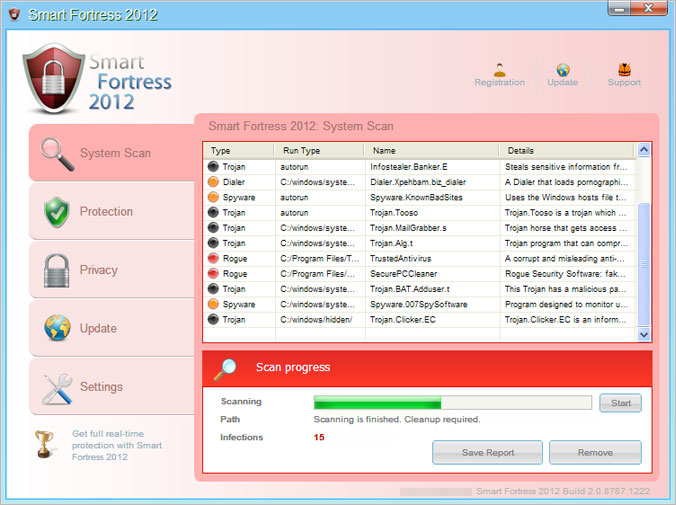
The graphical user interface of Smart Fortress 2012 GUI when it's not registered (trial).


Smart Fortress 2012 GUI when the rogue program is registered (full version).
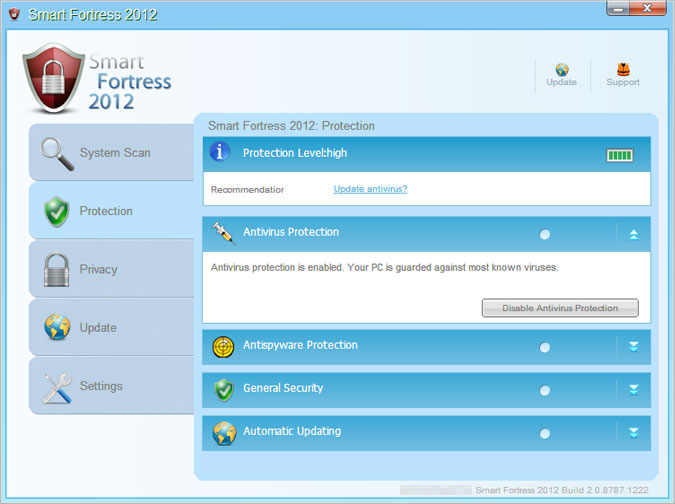


Color is the only difference. It seems that malware authors know color meanings very well. Pink color means danger, infected. Something that requires your attention. Blue means everything is OK. Calm down. Color psychology is a science and it's true that colors effect human behavior.

There are basically two concerns related to rogue anti-virus programs: false sense of security when you think that your computer is bullet proof and protected against the latest malicious code but it's not and identity theft. If you fall victim to a rogue anti-virus program or fraudulent security alert, you should contact your credit card company and dispute the charges. Whoever distributes this malicious program has to keep the number of charge backs as low as possible to be able to stay in the game. Otherwise, they will be banned from the network. Identity thieves may use gathered information for their further malicious activities or simply sell the information on illegal credit card marketplaces. One way or another, it's a huge risk.

Smart Fortress 2012 Version 3.1 is distributed in a numbers of ways, including via infected websites, fake online malware scanners, spam and social engineering. Keep in mind that rogue security programs can get installed on your computer without any interaction from your side. Your computer could be infected simply by visiting an infected website. It's called a 'drive-by download'. This method is very popular among cyber criminals who use exploit kits, mostly BlackHole, to distribute malware. The scheme is very simply - join a rogue AV affiliate network, choose a rogue anti-virus product Smart Fortress 2012 and generate your unique software build. Then you need to buy targeted traffic and you are ready to push some scareware. Thankfully, it's rather difficult to join fake AV affiliate networks nowadays.

Smart Fortress 2012 is probably the most aggressive scareware we've ever seen. It blocks pretty much everything on the compromised computer and constantly displays fake security alerts. It doesn't even allow you to rename its main executable file. You can't open any .exe, .com or .pif file. What is more, the rogue antivirus program stays active in Safe Mode. It basically takes over the whole user account.

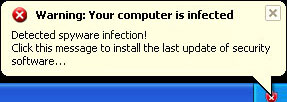
Warning! Your computer is infected - fake balloon notification claiming that your computer is infected with spyware.


Another fake security alert claiming that your machine is infected by a Trojan horse TrojanSPM/LX.
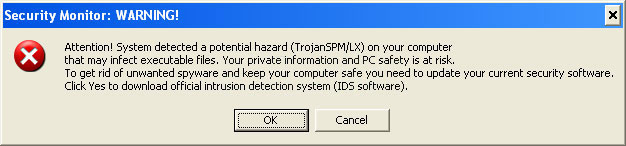


Such fake security alerts may look completely official. It may be very convincing to the unsuspecting users, and the prospect of being infected by Trojans and spyware can be very scary, which is why they may fall victim to this scam.

Smart Fortress 2012 might perform many other activities. It may install additional modules and files to monitor your computer use, install backdoor Trojans and hijack your web browser.

If your computer is infected by Smart Fortress 2012, stop work immediately as this may provide identity thieves with more information about you. To remove Smart Fortress 2012 and associated malware from your computer, please follow the steps in the removal guide below. Some other sites on the internet will probably show you how to remove this virus manually. However, this isn't a good idea. This malware modifies Windows registry and makes some serious changes to your machine that you may not be able to handle properly. If you need extra help removing this virus from your computer, please leave a comment. Good luck and be safe online!


Quick Smart Fortress 2012 removal instructions:

1. Open Smart Fortress 2012 scanner. Click the "Registration" button (top right corner). Enter the following debugged registration key and click "Activate" to register the rogue antivirus program. Don't worry, this is completely legal since it's not genuine software.

AA39754E-715219CE
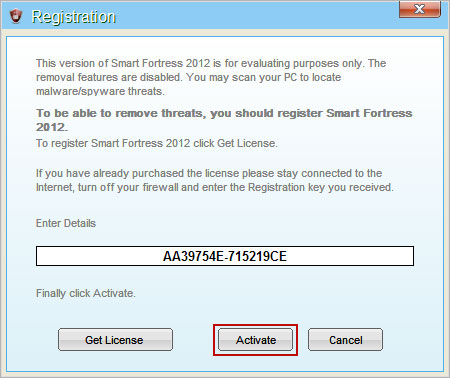


Once this is done, you are free to install recommended anti-malware software and remove Smart Fortress 2012 virus from your computer properly.

2. Download recommended anti-malware software (Spyware Doctor) and run a full system scan to remove this virus from your computer.

NOTE: don't forget to update anti-malware software before scanning your computer. That's it! Your computer should be virus free.

Tips for avoiding rogue security software:
  • Turn on automatic updates. Install all Windows and software updates.
  • Install a reliable antivirus program and firewall. Make sure your antivirus program is up to date.
  • Use caution when following links on social networks and websites that visit for the first time.
  • Use a standard user account instead of an administrator account, especially when visiting suspicious websites or opening potentially harmful files.
  • Don't download software from unknown sources.
  • Back up your critical files.

Associated Smart Fortress 2012 files and registry values:

Files:

Windows XP:
  • C:\Documents and Settings\All Users\Application Data\[SET OF RANDOM CHARACTERS].exe
Windows Vista/7:
  • C:\ProgramData\[SET OF RANDOM CHARACTERS].exe
Registry values:
  • HKEY_CURRENT_USER\Software\Microsoft\Windows\CurrentVersion\RunOnce "[SET OF RANDOM CHARACTERS]"
Tell your friends:

Monday, 27 February 2012

How to Remove Windows Basic Antivirus (Uninstall Guide)

Windows Basic Antivirus is a phony anti-virus product that pretends to scan your computer for viruses. It supposedly fights spyware, Trojans and other malicious software. Malware authors and identity thieves use rogue security products to scare users into paying for completely bogus security products. It's very convenient for identity thieves because they don't have to install additional spyware modules on compromised computers in order to steal credit card numbers, passwords and any other personally identifiable information. Unsuspecting users enter all the required information and basically give away their sensitive information to malware authors. Therefor, DO NOT purchase Windows Basic Antivirus and do not follow on screen instructions. Ignore false scan results and fake security alerts claiming that your computer is infected with some very sophisticated malware. It is a false claim meant to extort money out of you.

Rogue antivirus programs have plagued computer users for months. Windows Basic Antivirus is a fresh variant but we have had three occurrences of it already this day. We believe it will spread for two or three days more. It won't last for a week. That's for sure. Malware authors would rather release a re-branded version of the same malware instead of pushing the old one. Malware authors use 'human engineering' to trick users into installing malicious software, Windows Basic Antivirus. We should also mention drive-by download and spam campaigns. These are the most popular infection vectors.

To remove Windows Basic Antivirus, please follow this removal guide (don't worry, it's the same malware but with a different name).

How to protect yourself from becoming a scareware victim again.
  • Update your operating system and software immediately.
  • Install reliable antivirus software and keep it up to date. You may also consider installing application that provides proactive protection.
  • Scan every file before opening it.
  • Don't click on suspicious web links.
Windows Basic Antivirus splash screen:


Windows Basic Antivirus GUI:


Windows Basic Antivirus payment form. Rogue program loads information from online-secure-pay.info where the actual order form is located.


Tell your friends:

Saturday, 25 February 2012

Windows Secure Kit 2011 Browser Hijack

Windows Secure Kit 2011 is a fake online virus scanner which claims that your computer is infected with malicious software. It attempts to scare you into downloading rogue security products to remove non-existent viruses. While these fake pop-ups are not malicious they may still lead many unsuspecting users to malware (simply visiting such fake scanners is not enough to infect the system, user interaction is required). If you experience fake Windows Secure Kit 2011 pop-ups, you should scan your computer with legit anti-malware software. Be careful with your mouse because simply clicking on the fake malware scanner can actually start the rogueware download. If you think you have accidentally installed a rogue anti-virus program, please let us know. Good luck and be safe online!
Windows Secure Kit 2011 has found critical process activity on your PC and will perform fast scan of system files!


Fast scan results, assumed malware infections. Pay attention to the fact how Windows Secure Kit 2011 impersonates Windows GUI. Do not follow on screen instructions and close your web browser. If this browser hijacker does not allow you to close your web browser, simply use Alt-F4 keyboard shortcut.


Tell your friends:

SysWatch Giveaways And Deals

SysWatch Personal - Free 1 Year License

SysWatch Personal proactive protection for Microsoft Security Essentials. Add some extra protection on your computer and prevent system changes made by malicious software. Especially useful when using MSE as only virus protection software. This program uses behavioral-based detection, so it shouldn't conflict with other security products, anti-spwyare, etc.

For more details, please visit http://www.safensoft.com/home/free/personal/

Tell your friends:

Thursday, 23 February 2012

Remove Antivirus Protection 2012 (Uninstall Guide)

Antivirus Protection 2012 is rogue (low quality) anti-virus program which claims that your computer has been infected by Trojan horses, keyloggers, rootkits and other sophisticated malware without any specific evidence. The moment Antivirus Protection is installed on your computer, it will begin to scan your system for malicious software. Malware scan takes just few seconds, whereas a legit antivirus program may take a few hours to complete the scan. Once the scan is finished, the rogue anti-virus program will report finding dozens of infections on your computer to scare you into compliance. Furthermore, it will display fake security alerts. These alerts (see images below) often look very realistic. Masked as anti-virus program, Antivirus Protection 2012 will claim that you need to pay money to register the software in order to remove found threats. It's very important to research any software before purchasing it. Especially, if it suddenly pops up on your computer and tells you that you are infected.


It's not a new family of malicious software. Early versions first surfaced three years ago under various names such as Security Monitor 2012, AntiVirus System 2011, etc. The graphical user interface hasn't changed much since then. High conversation rates is perhaps the most likely reason why they've used the same GUI over the years. We have to admit that Antivirus Protection 2012 and fake security alerts often mimic and look very much like the actual Windows Security Center and Windows system warnings. Thus they may look quite legitimate to unsuspecting users.

How does rogue security software get on my computer? Simply visiting a website is enough for an attacker to infect your computer with Antivirus Protection 2012 malware. This is known as a "drive-by download". Malware authors use commercial crimeware kits, BalckHole is probably the most popular, to exploit software vulnerabilities and install malicious code. So, basically, you don't even need to click or download anything. Malware is getting more serious, not less. Cyber crooks get better at repacking and avoiding detection by anti-virus software. You MUST update Windows and the software installed on your computer. This is very true for Adobe, Java and some other software. A significant percentage of successful malware attacks comes through social engineering techniques as well. Needless to say, we shouldn't forget spam even thought the global spam volume dropped significantly since last summer.

Fake Security Center Alert claiming that your computer has been infected by Sft.dez.Wien virus. Never heard of it. Must be a new one ;)


Another fake security alert claiming that your computer is sending out an enormous volume of spam.


System critical warning!
You have been infected by a proxy-relay trojan server with new and danger "SpamBots".

Antivirus Protection 2012 payment page "Secure transaction browser".


Let's proceed to the most important part of this article: Antivirus Protection 2012 removal. This rogue anti-virus has payloads worse than fake security alerts. It blocks certain Windows utilities and legit anti-malware software rendering your computer pretty much useless. You may not be able to run your favorite malware removal tool in Normal Mode. If so, please reboot your computer in Safe Mode with Networking. Fake AVs usually stay inactive while working in Safe Mode. To remove Antivirus Protection 2012 and associated malware from your computer, please follow the steps in the removal guide below. Users needing further assistance with this malware, please let us know. Simply leave a comment below. Good luck and be safe online!

Source: http://deletemalware.blogspot.com


Quick Antivirus Protection 2012 removal guide:

1. Use this debugged serial key LIC-00A5-3F5G-BHA5-KJB8-579F-CVH9-M935-QW45-89M5-19AB to register the fake antivirus in order to stop the fake security alerts. Just click the Activate button and enter the reg key manually. Don't worry, this is completely legal.


Once this is done, you are free to install anti-malware software and remove the rogue anti-virus program from your computer properly.

2. Download recommended anti-malware software (Spyware Doctor) and run a full system scan to remove this Antivirus Protection 2012 from your computer.


Alternate Antivirus Protection 2012 removal instructions:

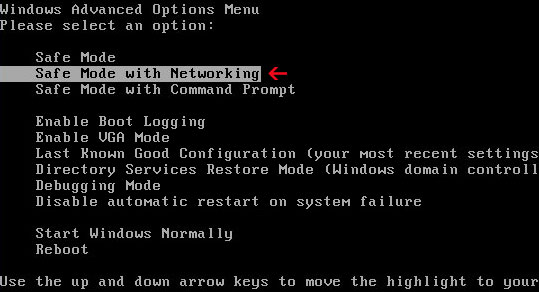
1. Reboot your computer is "Safe Mode with Networking". As the computer is booting tap the "F8 key" continuously which should bring up the "Windows Advanced Options Menu" as shown below. Use your arrow keys to move to "Safe Mode with Networking" and press Enter key.


NOTE: Login as the same user you were previously logged in with in the normal Windows mode.

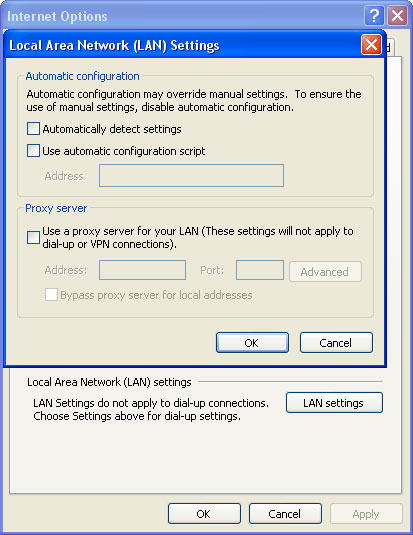
2. Launch Internet Explorer. In Internet Explorer go to: ToolsInternet OptionsConnections tab. Click Lan Settings button and uncheck the checkbox labeled Use a proxy server for your LAN. Click OK. You may have to repeat steps 1-2 if you will have problems downloading malware removal programs.


3. Download recommended anti-malware software (Spyware Doctor) and run a full system scan to remove this Antivirus Protection 2012 from your computer.

Tell your friends:

Wednesday, 22 February 2012

How to Bypass Surveys? Online Surveys and Your Privacy

Several times a day, most days of the week, we receive email from our readers asking the same question: how to bypass surveys? (mostly sharecash, CPALead and file ice). We love getting email, however, it's not always possible for us to reply individually and we are starting to get a little bored.

We think surveys is pretty much always a sign of a scam, so probably no one's going to like this answer. Here's how it works. CPA (cost per action) ad networks pay only when the desired action has occurred; for example, an online survey has been successfully completed. Affiliate marketers make commission based off your submission of information to a company database. It can be email address, phone number or any other information about you. This information can and probably will be used in future marketing campaigns.


Let's say you want to watch your favorite TV show online. You found a website which looks legit and has your favorite TV show. You're about to watch it but the website brings you to a survey that you have to fill out to get to the content. Usually, you can choose from several offers. My all time 'favorite' is the Love Thermometer. Basically, you need to sign up for the Love Thermometer by entering your phone number. It costs $10 per week to send your 'scores'. Bonus: they will send ads to your phone. Isn't that great? Honestly, it doesn't worth the risk. The truth be told, there are literally hundreds of fake internet survey websites. So, I wouldn't fill out paid surveys if I were you. After all, you may not get the requested file or video simply because it doesn't exist. There are many free and safe websites that offer file downloads and video streaming without annoying pop-up surveys.

Recently we stumbled upon another potentially harmful online survey which encourages users to install free 'Coupon Printer'. Everyone wants to save money, so Coupon Printer isn't such a bad idea after all. However, you need to read every single line very carefully before installing 'printers' and other software recommend in surveys. In our case, the 'Coupon Printer' offer came with an extra 'ingredient' -- MyWebSearch adware. We couldn't even finish the survey because our antivirus software blocked it.

Unfortunately, there's no easy way to bypass surveys on websites. Let's take Share Cash surveys for instance. You can't really bypass their extremely annoying surveys and it's not because we haven't tried, it's because the way they laid it out. Disabling JavaScript in your web browser won't help. Using XJZ survey remover and NoScript add-on won't help you either. None of these tools can actually fill out or skip surveys for you. They are designed to reveal premium (protected) content in a slightly different way. Please note, surveys ≠ 'premium' content lockers. However, you might get lucky with other survey websites.

Bypassing surveys:

1. Survey-remover.com, formerly known as XJZ Survey Remover. This bookmarklet was designed to reveal protected areas on websites. Removes surveys most of the time but it doesn't work if the survey leads to a download (sharecash). Works on Mozilla Firefox and Google Chrome. For more details, please visit this website: http://survey-remover.com/bookmarklet/

2. Use NoScript. A great web browser add-on trusted by many PC users. It was designed to block malicious JavaScript files but in some cases it may help you to bypass pop-up surveys too.

3. Disable JavaScript. This method is the most easiest one. However, we have to admit it rarely works. Most likely, you will get an error message followed by step-by-step instructions on how to enable JavaScript in your web browser.

4. If you get surveys from websites that normally do not serve them or surveys simply pop-up on your computer screen then your computer might have been infected with malware. Cyber criminals use surveys to monetize traffic. Download and scan your computer with recommended anti-malware software to make sure that the system is malware free.

We hope this helps. If you have any questions that aren't answered here, please feel free to contact us. Simply leave a comment below. Also, if you know how to bypass specific surveys sites, please share the information with our readers. Good luck and be safe online!

Tell your friends:

Monday, 20 February 2012

Windows Smart Warden Removal

Windows Smart Warden is a rogue anti-malware program that gains access to a system mostly by means of fake online virus scanners and hacked websites. More specifically speaking it's a Trojan horse disguised itself as anti-malware software. The most common goal of Windows Smart Warden is to steal personal information: name, credit card number, etc. Once installed, this rogue anti-malware program will state your computer is badly infected and that found malware can be only removed if the full version of the rogue software is purchased. It can be very difficult to properly remove Windows Smart Warden. Especially, if it comes bundled with rootkits and spyware modules. Detailed manual instructions on removing this rogue anti-malware software can be found by clicking here (this removal guide was written for the same malware, although it is being distributed with a different name now).

Windows Smart Warden GUI and some fake security alerts:


Fake error notification


Another error message claiming that your computer is infected with spyware


Warning! Virus detected Trojan-SMS


Tell your friends: