Windows Antivirus 2012 has found critical process activity on your PC and will perform fast scan of system files! -- if a dialog box comes up with something similar, please do not click on anything and leave the web page immediately. It's a part of blackhat SEO attack that leads users to fake virus scanners. Social engineering and black hat SEO attacks are still very popular even though the volume of successfully executed attacks has decreased significantly during the last six months. Reputable security products use URL filtering and generic detections for certain components of well thought search engine optimization attacks, but it seems that cyber crooks have found other ways to game the search engines (anti-spam teams). Fake online virus scanners are back and kickin'.
Rogue anti-virus programs from the FakeVimes family are being installed at the time of writing. It's one of the most widely spread scareware for a couple of months now. The problem with fake virus scanners is that only few AV programs will actually catch them. Very often such attacks defeat even the most determined users, who will allow rogueware to be installed on their machines no matter how much you teach them. Besides, cyber crooks are constantly looking for improvements that will increase conversion rates. A security message from Windows Antivirus 2012 seems quite legit and confusing at the same time, isn't it? People might think is a genuine Windows warning. Also, most of us tend to trust search engines results. When we get a security warning from a web page that is listed on the first page of results, we think that something is definitely not right because Google or any other popular search engine wouldn't allow misleading websites to show up in the search results in the first place. Unfortunately, this is not always the case.
Fake Windows Antivirus 2012 scanner claims that your computer is infected with malicious software. It randomly displays infections supposedly found during the scan, which is by the super fast :) The truth be told, it doesn't scan your PC for malware. It's just a simple javascript file that displays nice graphics and scan animation to scare you. Don't download or install anything from such websites. Close the fake scanner immediately and run a full system scan with up to date antivirus software to be sure that your computer is clean. If you have any questions, please leave a comment below. Good luck and be safe online!
Although the growth of browser (search results) redirects associated with rootkits and orther malware has been declining quite rapidly since the middle of last year (except for a few spikes during holidays) many people are still having issues with the 'redirect virus'. That's how many of you would call it. It's an evergreen niche, sort of... Recently, my aunt contracted a virus that was redirecting every search she did to Happili.com. Obviously, she wasn't happy about that :) She had it among other redirect and ads. This is a very common problem faced by thousands of pc users every day. Occasionally when you search on Google or any other web search engine for that matter and then click a search result you get redirected to a website full of ads or even worse - malicious code. Sometimes, you may get the 404 not found web server error when you click a search result. This happens when malware authors add new domains but their malicious code still redirects users to old websites. Most of the incidents reported by our readers during the last couple of weeks were one way or another associated with websites called Gimmeanswer and Happili.
Happili redirect virus or whatever you may call it, is just another domain/site involved in malicious scheme when cyber criminals earn more every time affected user clicks the ad or installs affiliated software. Usually, cyber crooks change domain names every few weeks or so but I've seen some domains that are used to distribute malware for at least a couple of months and they are still active. It might be that these domains are accepted by certain companies that monetize parked domains. Cyber crooks increase traffic using malicious software and infected computers and at the same time earn some nice money while displaying paid ads. However, this is probably not the case.
Even thought, the URL says happili.com, the rootkit loads content from entirely different website - x2838954xc(dot)com.
ZAccess/Sirefef rootkit creates a new Windows services called DCamUSBDXGT [symmpi].
Removing Happili virus is not an easy task, unfortunately. It has nothing to do with your web browser. Happili.com as well as many other redirects are very often caused by rather sophisticated malware called ZeroAccess or Sirefef. The problem is that this rootkit cannot be removed with popular anti-spyware software, e.g. Malwarebytes' Anti-malware. It may however remove associated malware from the infected computer, trojan droppers, etc. If you want to get rid of ZeroAccess rootkit and stop annoying redirects you need to use removal tools designed to remove this specific infection.
TDSSKiller by Kaspersly is probably the most popular but other antivirus software companies have ZAccess removal tools as well. Besides, sometimes TDSSKiller fails to remove infected files from the system, so it's always a good idea to use alternate removal tools just to be sure that your PC is perfectly clean and the that virus was successfully removed. AVG Win32/ZeroAccess remover removes most of the ZAccess/Sirefef variants but very often fails to remove newly released samples. Symantec offers ZeroAccess Fix Tool 1.0.0 which detects and removes this infection but may not work with the latest variants of the roorkit. It cleans the .sys file but not the malicious module, so once you restart your computer, the rootkit patches new drivers. I'm not saying that these utilities are useless but Panda, BitDefender and Webroot offer removal tools that worked for me almost every single time when I was dealing with the ZeroAccess rootkit. So, I definitely recommend scanning your computer with these great utilities before running your favorite anti-malware software. Please note that certain variants of this rootkit blocks legit anti-malware software and security related websites.
To remove the remnants of Happili virus from your computer you should run a full system scan with updated anti-malware software. Also, you should check your LAN settings, make sure that your internet settings are set up correctly, flush DNS cache and make sure that Windows Hosts file was not modified. For more more details, please read this removal guide. If you have any questions or need assistance removing this malware from your computer, please leave a comment below. Good luck and be safe online!
Happili virus removal instructions:
1. First of all, download and run TDSSKiller by Kaspersky. This utility will remove malicious .dlls and infected memory modules.
2. Then download recommended anti-malware software (Spyware Doctor) and run a full system scan to remove the remnants of this virus from your computer. Don't forget to update anti-malware software before scanning.
NOTE: in some cases the rogue program may block anti-malware software. Before saving the selected program onto your computer, you may have to rename the installer to iexplore.exe or winlogon.exe With all of these tools, if running Windows 7 or Vista they MUST be run as administrator. Launch the program and follow the prompts.
Happili virus removal instructions for Mac users:
1. Update Java to remove the most common variants of the Flashback malware which causes Happili.com redirection. Learn more: http://support.apple.com/kb/HT5242
If you are a regular visitor to our blog you probably noticed that the last few weeks had been a bit slow compared to the previous months. This is mostly due that we have been working on other projects. Besides, the volume of actively spread rogue security products has decreased significantly over the past few weeks, at least in some regions, which is a good thing after all. However, malware authors will probably exploit Easter just like any other special event to send out rogue security programs and other malicious software. Malware may show up in Easter greeting cards and images, so please be very cautious when downloading and opening Easter greeting cards, especially this weekend. Cyber crooks are already distributing new rogue security programs and will probably double the number of new malware samples this weekend.
Ok, so today we are looking at a new rogue security program called Advanced Antispyware Solution. As far as we can tell, this rogue security program is being delivered through Twitter spam messages that lead to fake Windows Antivirus 2012 online scanners. All the domains that were found distributing this malware had .info TLDs. Some of the popular registrars offered .info domains for under $5 or less, so cyber crooks apparently bought lots of .info domains as well.
Advanced Antispyware Solution reports non-existent malware infections and displays lost of fake and very annoying security alerts to make you think that your computer is infected. All the rogue applications from the FakeVimes family, we've seen more than ten this year so far, share common characteristics. Once installed, Advanced Antispyware Solution drops several absolutely harmless files on the compromised computer. The rogue program later pretends to scan the compromised computer for malware and once the 'scan' is finished, it flags those files as dangerous. A funny things is that this rogue anti-spyware drops and detects exactly the same files on each and every compromised machine.
Fake security alerts are rather well designed and may look like a real thing for unsuspecting computer users despite the fact people are being exposed to technology like never before. Here are some of the fake security alerts you may see when your computer is infected with Advanced Antispyware Solution scareware:
What is more, this malware may block Windows system utilities and genuine malware removal tools. Some variants of this malware may modify Windows host file and redirect users to misleading websites. We will show you how to restore the Windows Host file in the removal guide below. You should scan your computer for rootkits as well, because removing Advanced Antispyware Solution won't help you much if you won't get rid of rootkits. You can remove this rogue anti-spyware program using legit anti-malware software recommended in the removal guide below. Follow the steps in the removal guide very carefully. If you need help removing this malware from your computer, please leave a comment. Good luck and be safe online!
Advanced Antispyware Solution removal guide:
1. Click on Help and select Activate Now.
2. Enter one the following debugged registration keys and click Activate to register the rogue antivirus program. Don't worry, this is completely legal since it's not genuine software.
Emsisoft Easter Offer: 3 licenses for the price of 1
The Easter Bunny comes to town and brings some great presents for you: two additional free licenses with every purchase of an Emsisoft full version license. Even of you don't need additional licenses, you can share them with your family and friends. Help them to fully secure their computers and save some extra bucks. Who knows, maybe they will buy you a chocolate rabbit in return ;)
This offers lasts until April 9th, 2012 and only applies to new purchases of 1-year licenses. No renewals. Besides, you need to you those free licenses within two months after date of purchasel otherwise, they will expire.
50% Off VIPRE Antivirus 2012 and VIPRE Internet Security 2012
Receive a 50% discount on VIPRE Antivirus 2012 or VIPRE Internet Security 2012 license (expired trial). Hurry up because this is a limited-time offer, valid until April 15th, 2012. If your trial license is about to expire and you're planning to extend it, this is a great chance to save some extra bucks. Personally, I don't use any of their products but I can assure you that GFI does a great job protecting computers from the latest malware attacks.
PRS for Music Your computer has been locked is a scam (ransomware) that tries to extort money from unsuspecting computer users. Earlier this month, Performing Right Society issued a statement in which they clarified that the virus has nothing to do with PRS for Music and that they are investigating this issue. Now, why the hell they should care so much about this malware? Well, probably because cyber crooks use their logo, in association with Metropolitan police apparently, to make it the most genuine looking scam you've seen in a long time. This scam is a particularly nasty one and unfortunately very widespread at the moment. So, what does this ransomware do exactly? Once installed, it hijacks your Desktop with a rather professionally done fullscreen warning claiming to be from PRS for Music and Metropolitan Police. Please see the image below:
The warning states that illegally downloaded music files have been found on your computer and for this reason your computer has been locked.
PRS for Music
Your computer has been locked
Illegally downloaded music pieces (pirated) have been located on your computer. By downloading, those music pieces were reproduced, thereby involving a criminal offence under Section 106 of the Copyright Act. ....
I don't know much about the copyright laws in the United Kingdom but even if there is such an act you're not violating it, so don't panic. To further scare you into thinking that PRS for Music warning is a real deal, cyber crooks use Geo IP functions to determine your IP address and host name. It actually calls the command and control server before displaying the actual warning. It is worth mentioning that cyber crooks target computer users in other countries as well.
Gema and GVU - Germany
Sacem - France
Buma Stemra - The Netherlands
Suisa - Switzerland
AKM - Austria
All the organization in Europe protect the interest of songwriters, composers, and publishers.
When running, PRS for Music scam/ransomware claims that the illegally obtained music files were encrypted and moved to protected folder. This is not true. Although, this ransomware might be a bear to remove, it's not very sophisticated and even has some critical bugs that I will show you later can be used to bypass the restrictions in a few simple steps. Further more, PRS for Music ransomware claims that you need to pay £50 to avoid prosecution and imprisonment. DO NOT GIVE THESE SCAMMERS YOUR MONEY. First of all, you will simply lose your money and you probably won't able to get them back because payments must be made via PaySafecard, PayPoint or something along those lines. They accept anonymous payments. Secondly, they won't unlock your computer.
You should also know that this ransomware cannot steal personally identifiable or sensitive information. It cannot delete any of your files either. Don't worry, you haven't lost your files, etc. You just need to remove PRS for Music Your from your computer. That's it. If you're not good with computers, you can simply take your computer to a local repair store. It may cost you around $200 to get your computer back up and running again. Or you can try to remove this scam manually yourself. Please follow the removal instructions below.
How to prevent receiving PRS for Music scam/ransomware?
First, update your software, especially Adobe, Java and your web browsers. Use up-to-date antivirus software and additional firewall. As far as I know, cyber crooks use BlackHole, by far the most widely used exploit pack, to distribute this ransomware. Simply visiting infected websites may get you into trouble. Please watch the video below showing how cyber crooks armed with the latest version of BlackHole 1.2.3 can easily infect your computer if you're running outdated version of Java. The exploit targets a bug in Java (CVE-20120-0507).
PRS for Music scam stays active in Safe Mode, Safe Mode with Networking and even in Safe Mode with Command Prompt. However, once you rebooted your PC in Safe Mode with Command Prompt you have a few seconds to open Windows explorer. If you are lucky enough you might be able to restore your computer to a previous date when your computer was virus free.
PRS for Music removal instructions (System Restore):
1. Reboot your computer is "Safe Mode with Command Prompt". As the computer is booting tap the "F8 key" continuously which should bring up the "Windows Advanced Options Menu" as shown below. Use your arrow keys to move to "Safe Mode with Command Prompt" and press Enter key.
2. Make sure you log in to an account with administrative privileges (login as admin).
3. Once the Command Prompt appears you have few seconds to type in explorer and hit Enter. If you fail to do it within 2-3 seconds, the PRS for Music ransomware will take over and will not let you type anymore.
4. If you managed to bring up Windows Explorer you can now browse into:
Win XP:C:\windows\system32\restore\rstrui.exe and press Enter
Win Vista/Seven:C:\windows\system32\rstrui.exe and press Enter
5. Follow the steps to restore your PC into an earlier day.
Alternate PRS for Music ransomware removal using Print to file option:
A blogger named Thice wrote a great removal guide that can be used to remove PRS for Music scam without a need to reboot your computer in Safe Mode. Although, the removal guide was originally created to help users to remove Buma Stemra ransomware, it should work for PRS for Music as well. Basically, it's the same ransomware targeting computer users in different countries. Link to remove guide:
"I Want This!" is ad-supported software that may display targeted advertisements within the web pages you are viewing. It adds a button called "I Want This!" to Amazon and some other popular shopping websites. Note that Amazon offers its own Universal Wish List button, so it basically duplicates the official Amazon service. Clicking the button adds items you want to your wishlist and automatically posts them to your wall on your Facebook page. After some time browsing around in our favorite shopping sites, this adware started to display ads from third party companies and affiliates. For instance, if you're looking an iPad, there's a great chance you'll start receiving ads offering the discounts on the newest iPad or other popular tablet computers.
I Want This! adware collects various web usage information and some demographic information as well. First of all, it collects information about the websites you visit and the searches you perform using your favorite web search engines. In addition, I Want This! collects your IP address, zip code, and country you live in. It then share this information with partners and affiliates. Here's probably the most worrying clause from their privacy policy:
Examples of the information we may collect and analyze when you use our website include the IP address used to connect your computer to the Internet; login; e-mail address; password; computer and connection information such as browser type, version, and time zone setting, browser plug-in types and versions, operating system, and platform; the full Uniform Resource Locator (URL) clickstream to, through, and from the Site, including date and time; cookie; web pages you viewed or searched for; and the phone number you used to call us.
We don't know about you guys, but we think that the price is to high for a program that collects all this information and duplicates already exiting services.
Most of the time, I Want This! adware comes bundled with freeware and shareware. The one we tested came bundled with VLC player. We got it from a download websites that offers freeware software for Windows.
We've said this many times before, if you want to download a clean installer, download it from official website only. Otherwise, you may end up with adware, spyware or even malware. As for the I Want This! adware, we didn't find any silent installers. It means users can always decline the installation. At least we hope so :) We didn't have any problems uninstalling I Want This! from your computer either. You can simply uninstall it via Add/Remove Programs as shown below. Good luck and be safe online!
http://deletemalware.blogspot.com
I Want This! removal instructions:
1. First of all, download recommended anti-malware software and run a full system scan. It will detect and remove this infection from your computer. You may then follow the manual removal instructions below to remove the leftover traces of this browser hijacker. Hopefully you won't have to do that.
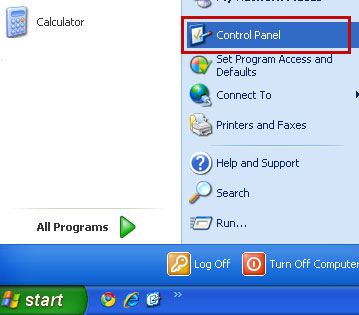
2. Go to the Start Menu. Select Control Panel → Add/Remove Programs. If you are using Windows Vista or Windows 7, select Control Panel → Uninstall a Program.
3. Search for I Want This! in the list. Select the program and click Remove button. If you are using Windows Vista/7, click Uninstall up near the top of that window.
4. Click Uninstall. Then restart your computer. I Want This! adware should be gone.
5. Download recommended anti-malware software and run run a full system scan to remove the remnants of this adware from your computer.