Sunday, 1 August 2010

Remove av-fox.com and antivirfox.com (Free Removal Instructions)

There are large amounts of websites on the Internet right now advertising a rogue anti-virus program called Antivir Solution Pro or just Antivir Solution. Typically, there are browser hijackers that claim that your computer has been infected with spyware. Such websites "pushes" rogue anti-virus programs and Antivir Solution Pro is at the top of the list. And obviously, there are also fake purchase pages. This time we have another four websites that look all the same and promote Antivir Solution Pro scareware:

  • av-fox.com
  • av-fox.net
  • antivirfox.com
  • antivirfox.net

The above websites provide false information and recommend buying rogue anti-virus software. If your computer is infected with Antivir Solution Pro then I guess you have already seen such bogus websites. Usually, users of compromised computers are redirected to a pay page of Antivir Solution Pro, but there is also a fake page titled "Internet Explorer Warning - visiting this web site may harm your computer!". If you find that your computer is infected with Antivir Solution Pro malware ir you are beinf redirected to av-fox.com, av-fox.net, antivirfox.com or antivirfox.net then please follow Antivir Solution Pro removal instructions. If you have already purhcased the bogus program then you should contact your credit card company and dispute the charges. As always, good luch and be safe!

Screenshot of av-fox.com


Share this information with other people:

Remove "Attention! Your web page request has been cancelled." (Free Removal)

"Attention! Your web page request has been cancelled." is a fake security warning. It looks just like the legitimate safe browsing warning which you probably have seen if you use Mozilla Firefox.

Fake "Attention! Your web page request has been cancelled." warning:


Legitimate "Reported Attack Site" warning:


The fake one pushes rogue anti-virus programs. If you click the "Fix Now" button you will be prompted to download or install a fake anti-virus program. The legitimate one doesn't promote any security software at all. It simply states that the website you're about to visit is currently listed as suspicious. Please note the differences between these two security warnings. If you see the Attention! Your web page request has been cancelled. warning, be sure that it's a fake one and that your computer is infected with some sort of malware, most likely Trojan Horse. Thankfully, there are some free anti-malware applications that you may use to remove malware. You should scan your PC with at least two anti-malware programs from the list below. Good luck and be safe!

Download at least one anti-malware program from the list below and run a full system scan.
NOTE: before saving the selected program onto your computer, please rename the installer to winlogon.exe or iexplore.exe. With all of these tools, if running Windows 7 or Vista they MUST be run as administrator. Launch the program and follow the prompts. Don't forget to update the installed program before scanning.

Share this information with other people:

Saturday, 31 July 2010

Remove "ATTENTION! SPYWARE ALERT" warning (Free Removal)

"ATTENTION! SPYWARE ALERT" is a fake warning that comes from the rogue anti-virus program called Antivir Solution Pro. It claims that your computer is infected. The text of the fake alerts is:
ATTENTION! SPYWARE ALERT
Vulnerabilities found.
Your computer is infected by spyware - 34 serious threats have been found while scanning your files and registry. It is strongly recommended that you disinfect your computer and active realtime secure protection against future intrusions.


As you can see, the fake security warning prompts you to active your antivirus software (which is Antivir Solution Pro of course) to protect your computer against malware. However, the truth is that Antivir Solution Pro is absolutely useless software. It won't protect your computer simply because it's an infection itself. It goes without saying that you should uninstall this misleading program and its bogus warnings like "attention! spyware alert" from your computer as soon as possible. For more details, please read how to remove Antivir Solution Pro from the computer for free using legitimate anti-malware programs. Your questions are more than welcome. Good luck and be safe!

Share this informaiton with other people:

Remove antispymv.com and antispymv.net (Free Removal)

Antispymv.com is a rogue website related to Antivir Solution Pro scareware. There's also another one — antispymv.net. Both websites promote the rogue anti-virus program. If your computer is infected with Antivir Solution Pro then I bet you've already seen those websites telling you to purchase the rogue program which is quite expensive by the way. It goes without saying that you shouldn't buy it. Firstly, it's not a legitimate program. Secondly, your credit card can be charged twice or sold to cyber criminals. If you have already purchased this bogus program then you should definitely contact your credit card company and dispute the charges or even cancel your credit card.

Obviously, you should remove the rogue program and any additional malware from your computer as soon as possible. First of all, you should read how to remove Antivir Solution Pro virus. You will find all information related to Antivir Solution Pro removal on the given page. It would be also helpful if you share this information with your friends. If you have any questions or additional information about this malware, don't hesitate and leave a comment. Good luck and be safe!


Share this information with other people:

Thursday, 22 July 2010

Remove antispybox.com and antispybox.net (Free Removal Guide)

Antispybox.com and antispybox.net should be added to the list of potentially harmful websites. Both websites promote the rogue security program called Antivir Solution Pro. They don't host malicious software and don't install any viruses on your computer (at least for now, but of course the situation could change at any time). Antispybox.com and antispybox.net "pushes" fake anti-virus software, provides false product reviews and awards to misleads users into paying for a full version of the program. In reality, the full version of this program doesn't even exist. Usually, users of the compromised computers are being redirected to the "Purchase" section of the rogue websites.

If your computer is infected with Antivir Solution Pro or Trojan Horses that promote the rogue anti-virus program, please read how to remove Antivir Solution Pro and any additional malware (including antispybox.com and antispybox.net) from your computer for free using legitimate anti-malware programs. Remember, this program is a scam, so obviously you shouldn't purchase it. Finally, if you have any questions or additional information about this virus, please leave a comment. Good luck and be safe!


Share this information with other people:

Remove Earth Antivirus or Earth AV (Uninstall Instructions)

Earth Antivirus is a fake anti-virus program that gives exaggerated reports of infections on your computer. It pretends to be a legitimate security application and states that your computer is infected with spyware, adware, Trojan Horses, worms and other malware. The rogue program displays fake security warnings too. Finally, Earth AV prompts to pay for a full version of the program to remove the infections which actually don't even exist. It your computer is infected with this rogue program, please don't purchase it. It goes without saying that you shouldn't keep it on your computer. The removal instructions below gives you full details on how to remove Earth Antivirus and any related malware for free.


If you are reading this article, then your computer is probably infected with this malware. Hopefully, you can remove it quite easily with a help of free anti-malware programs. If you don't know where did Earth Antivirus come from and you didn't installed it yourself then your computer was already infected with Trojans that download such rogue program onto the compromised computers without users permission of knowledge. However, most of the time earth antivirus has to be manually installed. Once running, it displays numerous fake infections and constantly displays fake security warnings about serious security problems. The fake alerts may have the following messages:

"Spyware activity alert!
Trojan.IEMonster activity detected. It is spyware that attempts to steal passwords from Internet Explorer, Mozilla Firefox, Outlook and other programs, including logins and passwords from online banking sessions, eBay, PayPal."


"System files modification alert!
Some critical system files of your computer were modified by malicious program. It may cause system instability and data loss. Click here to block unathorised modifications by removing threats (Recommended)."

Furthermore, the rogue program hijacks web browsers and displays fake alerts when you browse the web. It blocks security related websites, anti-virus programs and any useful tools that could be used to remove Earth Antivirus.

The homepage of this rogue program is earth-av.com.


As you can see, Earth AV is nothing more but a scam. As we have already said, don't purchase it. If you have already bought it, then you should contact your credit card company and dispute the charges. Then get rid of Earth Antivirus as soon as possible. Please follow the removal instructions below. If you have any questions or additional information about this virus please don't hesitate and leave a comment. Good luck and be safe!


Earth Antivirus removal instructions:

1. Reboot your computer is "Safe Mode with Networking". As the computer is booting tap the "F8 key" continuously which should bring up the "Windows Advanced Options Menu" as shown below. Use your arrow keys to move to "Safe Mode with Networking" and press Enter key. Read more detailed instructions here: http://www.computerhope.com/issues/chsafe.htm
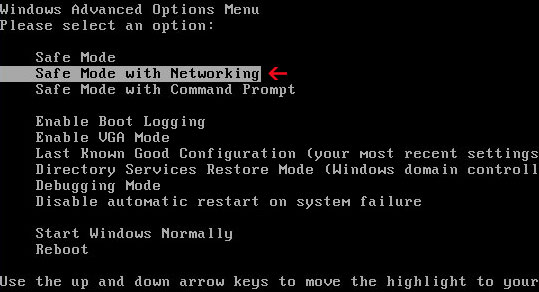


NOTE: Login as the same user you were previously logged in with in the normal Windows mode.

2. Download one of the following legitimate anti-malware applications and run a full system scan. Don’t forget to update it first. All programs a free.
NOTE: before saving the selected program onto your computer, please rename the installer to winlogon.exe or iexplore.exe. With all of these tools, if running Windows 7 or Vista they MUST be run as administrator. Launch the program and follow the prompts. Don't forget to update the installed program before scanning.

Share this information with other people:

Remove antispynew.com and antispynew.net (Free Removal)

Earlier today we came up with yet another two misleading websites related to Antivir Solution Pro malware — antispynew.com and antispynew.net. We won't go into details this time, because it's not the first post about such rogue websites. Besides, we think there are and will be many more such misleading websites that promote the rogue anti-virus program that calls it self Antivir Solution Pro. The most important question is how to avoid such scam and how to remove antispynew.com and antispynew.net from your computer for free?

There are several free anti-malware tools that remove rogue programs and related malware effectively and for free. Note, that malware creators "pushes" new versions of rogue programs regularly, that's why we strongly recommend you to scan your computer with at least two anti-malware programs. If one fails to detect the rogue program then maybe other won't. Just make sure that your anti-malware software is updated. Now, if you find that your computer is infected with Antivir Solution Pro or you are being redirected to antispynew.com or antispynew.net then read this article: How to remove Antivir Solution Pro. If you have any questions or additional information about this scareware, please don't hesitate and leave a comment. Good luck and be safe!

Screenshot of antispynew.com


Share this information with other people: