Tuesday, 30 March 2010

"MW2 map pack release time" black SEO campaign leads to malware

I'm not a huge fan of Call of Duty, but it seems that Call of Duty Modern Warfare 2 Stimulus package release is hot topic right now. Everybody is talking about this update, but as I said I'm not a huge fan so I don't really care. However, today I came across a black SEO campaign that distributes fake antivirus programs through Google related to Modern Warfare 2 Stimulus package release time. As a matter of fact, I've found at least 16 sites that redirect users to malicious websites that distribute rogue anti-virus programs. Unfortunately, some of those site are in the first Google search results page for at least 6 hours and they are still there. I did a search with the follow keywords:
  • modern warfare 2 stimulus package release time
  • mw2 map pack release time
  • call of duty modern warfare 2 map pack
And here's how the Google SERP looked after my search:


As you can see, there are three compromised websites in the first Google search results page. Those sites are not malicious, they are compromised legitimate sites. Unfortunately, they redirect user to infected ones. Of course, there are more.
  • h**p://************lery.com/ozerd.php
  • h**p://***pros.com/oapxs.php
  • h**p://************udios.com/hyusj.php
  • h**p://**ywm.com/pbcel.php
  • h**p://***oad.com/kspkg.php
  • h**p://**la.info/svuyb.php
  • h**p://*******gely.com/khaiv.php
  • h**p://*********ossip.net/hbixg.php
  • h**p://**wr.net/wfror.php
  • h**p://*******n-25.com/pkeac.php
  • h**p://**********tware.com/lizsj.php
  • h**p://**********sing.com/gfrwf.php
  • h**p://****sce.pl/qzudf.php
  • h**p://***dpc.com/igueg.php
  • h**p://*****fnek.com/qqueq.php
  • h**p://*****rts.com/sleia.php
All these sites redirect mainly to two malicious websites:
  • h**p://*******ne54.**rg.pl
  • h**p://***********stem.**rg.pl


These two malicious websites display fake warnings and report false system security threats to make you think that your computer is infected with malware.


Once again, the bad guys use hot topics and black SEO campaigns to "push" malware. You should rely mostly on well known and trusted course of information. After all, if you doubt about it - don't click it. Good luck and be safe!

Share this information with other people:

Sunday, 28 March 2010

Remove avp-sscannerr.org browser hijacker (Uninstall guide)

Avp-sscannerr.org is a browser hijacker. Basically, it's a fake online anti-malware scanner that reports false malware threats on your computer and then prompts you to download and install removal tool. There are also seven other sites that look and behaves just like avp-sscannerr.org. Here they are:
  • avonlinescanerr.org
  • avonlinescannerr.org
  • avplscanerr-online.org
  • avplus-scanerr.org
  • avp-scannerr.org
  • av-scaner-onlinepeople.org
  • av-scaner-onlinereview.org
All these misleading websites use the same web template. As you can see in the images below, Avp-sscannerr.org, avp-scannerr.org and others use Windows Vista style icons to make the whole scam look more realistic and legit. Actually, all these eight site promote the rogue antivirus program called Antivirus Plus.

You should close such fake site immediately if you were redirected from other bogus sites or infected online ads. Also you should scan your computer for malware with a legitimate anti-malware program. In some cases you don't actually have to click anything, Trojans enter a computer without your permission. There are several free and powerful anti-malware/spyware program that you can choose from:


Share this information with other people:

Remove Virremover.com scam (Uninstall guide)

Virremover.com is yet another misleading website that represents the rogue anti-spyware program called Antivirus Soft. We receive so many complaints about this virus and websites that promote it that it's almost impossible to inform about all of them. Recently, we got several complaints about Virremover.com, so we decided to draw your attention to this one. It's a typical misleading and it's full of false information. The main goal as usual is to trick as many people as possible into thinking that Antivirus Soft is a legitimate anti-virus program. That's definitely false.

If you are reading this article then your computer is infected either with Trojans or the rogue anti-virus program Antivirus Soft. There is a chance that the only issue is Virremover.com, however, that's a sign of infection as well. So, what to do next? The answer is actually very simple. You have to remove Antivirus Soft and any related malware from your computer including Virremover.com. Please follow free Antivirus Soft removal instructions. Good luck and be safe!


Share this information with other people:

Saturday, 27 March 2010

How to remove Control Center virus (Uninstall instructions)

Control Center is a fake (misleading) program. This fake program claims to be the best tool for keeping your computer secure and for making you Internet connection safe. It supposedly provides 15 system utilities or tools to manage your computer settings. Control Center malware is promoted through the use of fake online scanners, software vulnerabilities, phony video sites and etc. Just like all the other rogue programs, it reports either false system security threats or serious security/privacy errors. And of course, finally ControlCenter asks you to pay for a full version of the program to remove the infections/errors.


As a typical scareware, Control Center also displays fake warnings about possible threats from the Internet or badly infected files on your computer that may pose threats. It may also state that your computer us no longer safe and that your important files will be deleted if you won't take any actions to stop malware on your PC.


In reality, the only infection on your computer is Control Center. Call it whatever you want, but this program is a scam. Most importantly, don't purchase it. if you have already purchased it then contact your credit card company and dispute the charges. Then follow the removal instructions below to remove Control Center virus from your computer for free using legitimate anti-malware programs. Please note that this virus may block antivirus and anti-malware programs, that's why you may need to end its processes before downloading malware removal tools or reboot your computer is Safe Mode with Networking. Full removal details below. If you have any questions are additional information about this virus don't hesitate and leave a comment. Good luck and be safe!


Control Center removal instructions

1. Reboot your computer is "Safe Mode with Networking". As the computer is booting tap the "F8 key" continuously which should bring up the "Windows Advanced Options Menu" as shown below. Use your arrow keys to move to "Safe Mode with Networking" and press Enter key. Read more detailed instructions here: http://www.computerhope.com/issues/chsafe.htm
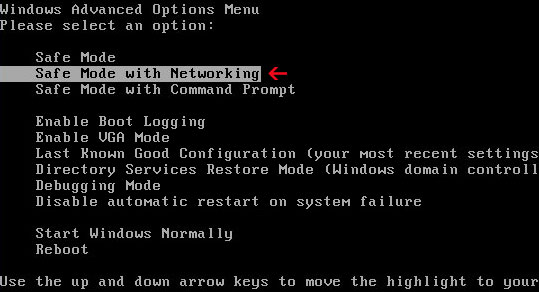


NOTE: Login as the same user you were previously logged in with in the normal Windows mode.

2.Download one of the following legitimate anti-malware applications and run a quick system scan. Don’t forget to update it first. All programs a free.

CleanUp Antivirus files and registry values:

Folders and files:
  • %UserProfile%\Application Data\Control Components
  • %UserProfile%\Application Data\Control Components\ccagent.exe
  • %UserProfile%\Application Data\Control Components\ccmain.exe
  • %UserProfile%\Application Data\Control Components\settings.ini
  • %UserProfile%\Application Data\Control Components\uninstall.exe
Registry values:
  • HKEY_LOCAL_MACHINE\SOFTWARE\Microsoft\Windows\CurrentVersion\Uninstall\Control Components
  • HKEY_CURRENT_USER\Software\Microsoft\Windows\CurrentVersion\Run "ccagent.exe"
  • HKEY_CURRENT_USER\Software\Microsoft\Windows NT\CurrentVersion\Winlogon "Shell" = "%UserProfile%\Application Data\Control Components\ccmain.exe"
Share this information with other people:

Thursday, 25 March 2010

How to remove "Online Protection Tool" fake pop-up (Free removal)

"Online Protection Tool" is a fake pop-up that looks like a legit Windows warning but actually it's a part of malware infection. If you see a repeated pop-up on your screen that suggests you to install Online Protection Tool, then your computer is probably infected with Trojan virus.

Usually, it appears when users use their web browsers (even if they use Safari and are running Mac OS). Several users said that they can't access the Microsoft Windows Update website and that they are occasionally redirected to other websites with advertisements. Furthermore, it seems like this malware can block already installed antivirus or anti-spyware programs.


"Online Protection Tool" pop-up reads:
Windows Internet Security
Your browser is under the threat of infection. Windows requires your permission to install online protection tool.
Your browser is run in unsafe mode. Running the protection mode will help you to keep your computer safe. Staying at the suspicious website is unsafe mode my lead to the loss of personal data and computer breakage. To run the web browser in protected mode windows requires installing the certified antivirus scanner software and online protection tool.
Name: online protection tool
Publisher: Microsoft windows

If you are reading this article then your computer is probably already infected. Thankfully, there are several free malware removal programs that you can use to remove this infection from your computer for free. You may choose from: (all programs are free)
Please note that you may have to download/run chosen anti-malware program in Safe Mode or Safe Mode with Networking as this virus is able to block anti-malware programs.

Also, if you already have MalwareBytes' Anti-malware installed on your PC but you can't launch it then go to C:\Program Files\Malwarebytes' Anti-Malware and rename the "mbam.exe" file within the folder. Then double-click on the ranamed.exe, in order to run it. You may rename it to test123.exe or anything else. More information here.
The same applies to other programs listed above.

If you have any questions question please don't hesitate and ask or leave a comment. Good luck and be safe!

Share this information with other people:

Virusdefender.org scam (Free removal)

Virusdefender.org is a misleading and dangerous site that distributes malware. Basically, it's screen with a fake animation, false system security threats and errors (fake online anti-malware scanner). As you can see in images below, Virusdefender.org fake scanner uses Windows Vista OS style, icons and etc. to make that scam look more realistic. Of course, it's kind of funny when you see Vista icons on a computer running Windows XP. Virusdefender.org domain was registered through bizcn.com and as you may guess its owner is from China. Registrant information:


After the fake scan, Virusdefender.org reports false scan results and prompts to download free malware removal tool. This supposed malware removal tool is actually a Trojan virus Win32/Agent.QOH [ESET]. If you have inadvertently downloaded something from Virusdefender.org then you should definitely scan your computer with antivirus or anti-malware program. You may choose from MalwareBytes' Anti-malware, Spyware Doctor, SUPERAntispyware, Spybot S&D, Combofix. If you have any questions please don't hesitate and ask or leave a comment. Good luck and be safe!

Screen shots of Virusdefender.org:


Share this information with other people:

Monday, 22 March 2010

How to remove Trojan.Win.Agent.dcc (Free removal)

Trojan.Win.Agent.dcc is a commonly reported false system security threat. Most recently, this fake infection was seen in fake warnings from the rogue anti-virus program called User Protection. However, please note that other rogue programs may display warnings with Trojan.Win.Agent.dcc infection as well.

Also, there is a Trojan virus called Trojan.Win32.Agent.dcc (real infection) so don't confuse them. By the way, Trojan.Win32.Agent.dcc just like Trojan.Win.Agent.dcc also appears in fake warnings, so after all it depends on the program you use. If this threat was reported bu legitimate programs then it probably really exists, but if comes from fake (rogue) program then you shouldn't worry too much. The fake Trojan.Win.Agent.dcc alert reads:

System alert: Trojan.Win.Agent.dcc
Defenseless OS: Windows 2000/XP/Vista
Description: Spyware try to steal payment details of your credit cards, bank account etc.
Protection: Click the balloon to install antivirus software.


If you find such fake infection on your computer then you are infected either with Trojan virus or with a rogue anti-spyware program. One way or another, you should run a full system scan and remove all found infections. You may choose from the following anti-malware/spyware programs: (all are free)

Also you should read User Protection removal instructions, because currently Trojan.Win.Agent.dcc fake warning comes from this fake program. Good luck and be safe!

Share this information with other people: