Friday, 5 August 2011

How to Remove Findxplorer (Uninstall Guide)

Findxplorer is adware/BHO that changes default search provider when searching directly from address/URL bar in your web browser. It returns very limited and sponsored search results. Whenever a user searches something directly from his web browser address bar this adware redirects him to findxplorer.com and displays paid search results but unfortunately not the most relevant. Besides, Findxplorer changes the way you search. I mean it can be really frustrating, especially when you use Google Chrome web browser and you search directly from the address bar which is very convenient and suddenly you get entirely different and very often unrelated search results. Findxplorer is actually the same type of infection as ResultUrl that was described in out previous post. Hopefully, you shouldn't have any problems removing Findxplorer from your computer. If you need help removing this adware from your computer, please leave a comment below. Good luck and be safe online!


Findxplorer removal instructions:

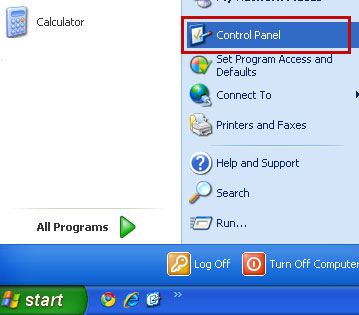
1. Go to the Start Menu. Select Control PanelAdd/Remove Programs.
If you are using Windows Vista or Windows 7, select Control PanelUninstall a Program.


2. Search for Findxplorer in the list. Select the program and click Change/Remove button.
If you are using Windows Vista/7, click Uninstall up near the top of that window.


Alternate removal: run C:\Program Files\FindXplorer\uninstall.exe

3. Download free anti-malware software from the list below and run a full system scan.
NOTE: With all of these tools, if running Windows 7 or Vista they MUST be run as administrator. Launch the program and follow the prompts. Don't forget to update the installed program before scanning.


Remove Findxplorer in Mozilla Firefox:

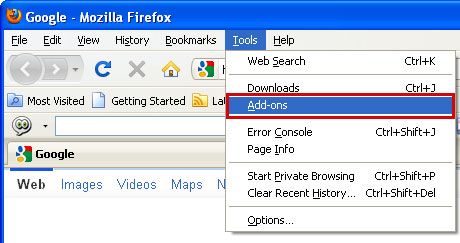
1. Open Mozilla Firefox. Go to ToolsAdd-ons.


2. Select Extensions. Choose FindXplorer and click Uninstall button.


Associated Findxplorer files and registry values:

Files:
  • C:\Program Files\FindXplorer\findxplorer.dll
  • C:\Program Files\FindXplorer\findxplorer.exe
  • C:\Program Files\FindXplorer\uninstall.exe
  • C:\Documents and Settings\All Users\Application Data\FindXplorer\findxplorer115.exe
Registry values:
  • HKEY_LOCAL_MACHINE\SOFTWARE\FindXplorer
  • HKEY_LOCAL_MACHINE\SOFTWARE\Microsoft\Windows\CurrentVersion\Uninstall\FindXplorer
  • HKEY_LOCAL_MACHINE\SYSTEM\ControlSet001\Enum\Root\LEGACY_FINDXPLORER_SERVICE
  • HKEY_LOCAL_MACHINE\SYSTEM\ControlSet001\Services\FindXplorer Service
  • HKEY_LOCAL_MACHINE\SYSTEM\CurrentControlSet\Services\FindXplorer Service
Share this information with your friends:

How to Remove Resulturl (Uninstall Guide)

Resulturl is classified as adware/BHO and potentially unwanted application by Norton, Kaspersky, Avast! and numerous other anti-virus software vendors in the market today. Paid and often very limited search results are probably the main reasons why it's detected as adware. Each time a user searches Google or any other search engine directly from the web address/URL bar it gets redirected to resulturl.com. Resulturl is configured to start automatically when Windows starts. It installs Mozilla Firefox Resulturl add-on and adds additional search provider in Internet Explorer. You should be able to remove Resulturl adware using Control Panel's Add/Remove feature. However, if you need help removing this adware from your computer, please leave a comment below. Good luck and be safe online!


Resulturl removal instructions:

1. Go to the Start Menu. Select Control PanelAdd/Remove Programs.
If you are using Windows Vista or Windows 7, select Control PanelUninstall a Program.


2. Search for ResultUrl in the list. Select the program and click Change/Remove button.
If you are using Windows Vista/7, click Uninstall up near the top of that window.


Alternate removal: run C:\Program Files\ResultUrl\uninstall.exe

3. Download free anti-malware software from the list below and run a full system scan.
NOTE: With all of these tools, if running Windows 7 or Vista they MUST be run as administrator. Launch the program and follow the prompts. Don't forget to update the installed program before scanning.


Remove Resulturl in Internet Explorer:

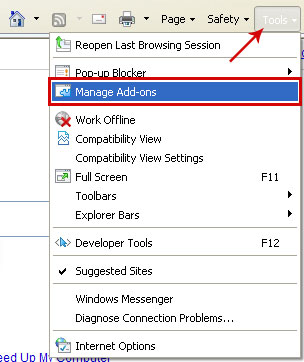
1. Open Internet Explorer. Go to ToolsManage Add-ons.


2. Select Search Providers. Select ResultUrl and click Remove button to remove it.


Remove Resulturl in Mozilla Firefox:

1. Open Mozilla Firefox. Go to ToolsAdd-ons.


2. Select Extensions. Choose Resulturl and click Uninstall button.


Associated Resulturl files and registry values:

Files:
  • C:\Program Files\ResultUrl
  • C:\Program Files\ResultUrl\ResultUrl_deleted_
  • C:\Program Files\ResultUrl\ResultUrl_deleted_\resulturl.dll
  • C:\Program Files\ResultUrl\ResultUrl_deleted_\resulturl.exe
  • C:\Program Files\ResultUrl\resulturl.dll
  • C:\Program Files\ResultUrl\resulturl.exe
  • C:\Program Files\ResultUrl\uninstall.exe
  • C:\Documents and Settings\All Users\Application Data\ResultUrl\resulturl191.exe
Registry values:
  • HKEY_LOCAL_MACHINE\SOFTWARE\ResultUrl
  • HKEY_LOCAL_MACHINE\SOFTWARE\Microsoft\Windows\CurrentVersion\Uninstall\ResultUrl
  • HKEY_LOCAL_MACHINE\SYSTEM\ControlSet001\Enum\Root\LEGACY_RESULTURL_SERVICE
  • HKEY_LOCAL_MACHINE\SYSTEM\ControlSet001\Services\ResultUrl Service
  • HKEY_LOCAL_MACHINE\SYSTEM\CurrentControlSet\Enum\Root\LEGACY_RESULTURL_SERVICE
  • HKEY_LOCAL_MACHINE\SYSTEM\CurrentControlSet\Services\ResultUrl Service
Share the knowledge:

Thursday, 4 August 2011

Remove Android.Hippo (Uninstall Guide)

Android.Hippo is a Trojan horse that disguises itself as popular game software and it has been seen on Android app marketplaces in China and fake app stores. It is also found with repackaged versions of popular applications. Android.Hippo is a typical trojan that sends SMS messages to premium-rate phone numbers. It can also delete incoming SMS messages from numbers that begin with certain digits, for example 10. So, if you've got a huge phone bill, it might be that your Android device is infected by a Trojan horse that sends SMS messages to premium-rate phone numbers. If you think that your mobile phone is infected, please run a full system scan with legitimate mobile security software and remove any suspicious apps from your device. Good luck and be safe online!

This trojan is also known as ANDROIDOS_HIPPOSMS.A.


Android.Hippo manual removal guide:

1. Open the Google Android Menu.
2. Go to the Settings icon and select Applications.
3. Next, click Manage.
4. Select the application and click the Uninstall button.

Additionally, you should scan your device with mobile antivirus software. All major antivirus software vendors offer Mobile Security products.
Share this information with your friends:

Remove Android.Smssniffer (Uninstall Guide)

Android.Smssniffer is a Trojan horse that sends all SMS messages received on the compromised Android device to a remote server. This trojan is found bundled with repackaged versions of popular games and applications, usually available for download from unofficial market places. To remove Android.Smssniffer from your smart phone please legitimate mobile antivirus software listed below. You can also remove any suspicious apps and running services manually. It't worth mentioning that you should download and install applications, games, etc., only from official marketplaces. Good luck and be safe online!


Android.Smssniffer manual removal guide:

1. Open the Google Android Menu.
2. Go to the Settings icon and select Applications.
3. Next, click Manage.
4. Select the application and click the Uninstall button.

Additionally, you should scan your device with mobile antivirus software. All major antivirus software vendors offer Mobile Security products.
Share the knowledge:

Wednesday, 3 August 2011

Remove Coupon Alert Toolbar (Uninstall Guide)

Coupon Alert Toolbar is classified as adware or potentially unwanted application by Kaspersky, NOD32, Avast! and some other anti-virus programs. It's not a virus. Coupon Alert Toolbar displays notifications about money-saving coupons when they become available or when you visit your favorite retail websites. You can also search for coupons right from the toolbar in Internet Explorer or Mozilla Firefox. The toolbar drops several executable files on your computer and one of those exe files runs automatically when Windows starts. Coupon Alert Toolbar is developed by the same company that develops My Web Search products. CouponAlert can be downloaded from couponalert.com but it can also come bundled with other freeware. You can uninstall Coupon Alert Toolbar using Control Panel's Add/Remove feature. However, if you have problems removing this toolbar from your web browsers, please follow the removal instructions below. Good luck and be safe online!


Coupon Alert Toolbar removal instructions:

1. First of all, download recommended anti-malware software and run a full system scan. It will detect and remove this infection from your computer. You may then follow the manual removal instructions below to remove the leftover traces of this browser hijacker. Hopefully you won't have to do that.


2. Go to the Start Menu. Select Control PanelAdd/Remove Programs.
If you are using Windows Vista or Windows 7, select Control PanelUninstall a Program.


3. Search for Coupon Alert in the list. Select the program and click Change/Remove button.
If you are using Windows Vista/7, click Uninstall up near the top of that window.


4. Download anti-malware software and run a full system scan.


Remove Coupon Alert Toolbar in Internet Explorer:

1. Open Internet Explorer. Go to ToolsManage Add-ons.


2. Select Toolbars and Extension. Choose Coupon Alert, Toolbar BHO, Search Assistant BHO from the list and click on Disable button.


3. Select Search Providers. Select My Web Search and click Remove button to remove it.


Remove Coupon Alert Toolbar in Mozilla Firefox:

1. Open Mozilla Firefox. Go to ToolsAdd-ons.


2. Select Extensions. Choose Scour Toolbar and click Disable button. Then uninstall the toolbar.


Associated Coupon Alert Toolbar files and registry values:

Files:
  • C:\Program Files\CouponAlert_2p
  • C:\Program Files\CouponAlert_2p\bar
  • C:\Program Files\CouponAlert_2p\bar\1.bin
  • C:\Program Files\CouponAlert_2p\bar\1.bin\chrome\2pffxtbr.jar
  • C:\Program Files\CouponAlert_2p\bar\1.bin\2pauxstb.dll
  • C:\Program Files\CouponAlert_2p\bar\1.bin\2pbar.dll
  • C:\Program Files\CouponAlert_2p\bar\1.bin\2pbarsvc.exe
  • C:\Program Files\CouponAlert_2p\bar\1.bin\2pbrmon.exe
  • C:\Program Files\CouponAlert_2p\bar\1.bin\2pbrstub.dll
  • C:\Program Files\CouponAlert_2p\bar\1.bin\2pdatact.dll
  • C:\Program Files\CouponAlert_2p\bar\1.bin\2pdlghk.dll
  • C:\Program Files\CouponAlert_2p\bar\1.bin\2pdyn.dll
  • C:\Program Files\CouponAlert_2p\bar\1.bin\2pfeedmg.dll
  • C:\Program Files\CouponAlert_2p\bar\1.bin\2phighin.exe
  • C:\Program Files\CouponAlert_2p\bar\1.bin\2phtml.dll
  • C:\Program Files\CouponAlert_2p\bar\1.bin\2phtmlmu.dll
  • C:\Program Files\CouponAlert_2p\bar\1.bin\2phttpct.dll
  • C:\Program Files\CouponAlert_2p\bar\1.bin\2pidle.dll
  • C:\Program Files\CouponAlert_2p\bar\1.bin\2pieovr.dll
  • C:\Program Files\CouponAlert_2p\bar\1.bin\2pimpipe.exe
  • C:\Program Files\CouponAlert_2p\bar\1.bin\2pmedint.exe
  • C:\Program Files\CouponAlert_2p\bar\1.bin\2pmlbtn.dll
  • C:\Program Files\CouponAlert_2p\bar\1.bin\2pmsg.dll
  • C:\Program Files\CouponAlert_2p\bar\1.bin\2pPlugin.dll
  • C:\Program Files\CouponAlert_2p\bar\1.bin\2pradio.dll
  • C:\Program Files\CouponAlert_2p\bar\1.bin\2pregfft.dll
  • C:\Program Files\CouponAlert_2p\bar\1.bin\2pregiet.dll
  • C:\Program Files\CouponAlert_2p\bar\1.bin\2pscript.dll
  • C:\Program Files\CouponAlert_2p\bar\1.bin\2pskin.dll
  • C:\Program Files\CouponAlert_2p\bar\1.bin\2pskplay.exe
  • C:\Program Files\CouponAlert_2p\bar\1.bin\2pSrcAs.dll
  • C:\Program Files\CouponAlert_2p\bar\1.bin\2ptpinst.dll
  • C:\Program Files\CouponAlert_2p\bar\1.bin\2puabtn.dll
  • C:\Program Files\CouponAlert_2p\bar\1.bin\CHROME.MANIFEST
  • C:\Program Files\CouponAlert_2p\bar\1.bin\INSTALL.RDF
  • C:\Program Files\CouponAlert_2p\bar\1.bin\LOGO.BMP
  • C:\Program Files\CouponAlert_2p\bar\1.bin\NP2pStub.dll
  • C:\Program Files\CouponAlert_2p\bar\1.bin\T8RES.DLL
  • C:\Program Files\CouponAlert_2p\bar\Cache\0007A46B.bmp
  • C:\Program Files\CouponAlert_2p\bar\Cache\00074EE9
  • C:\Program Files\CouponAlert_2p\bar\Cache\00075AC0.bmp
  • C:\Program Files\CouponAlert_2p\bar\Cache\00075BE9.bmp
  • C:\Program Files\CouponAlert_2p\bar\Cache\00075D02.bmp
  • C:\Program Files\CouponAlert_2p\bar\Cache\00075E2B.bmp
  • C:\Program Files\CouponAlert_2p\bar\Cache\00075F92.bmp
  • C:\Program Files\CouponAlert_2p\bar\Cache\00079C8C
  • C:\Program Files\CouponAlert_2p\bar\Cache\000756C8.bmp
  • C:\Program Files\CouponAlert_2p\bar\Cache\000760BB.bmp
  • C:\Program Files\CouponAlert_2p\bar\Cache\000757B3.bmp
  • C:\Program Files\CouponAlert_2p\bar\History\search3
  • C:\Program Files\CouponAlert_2p\bar\IE9Mesg\COMMON.T8S
  • C:\Program Files\CouponAlert_2p\bar\Message\COMMON.T8S
  • C:\Program Files\CouponAlert_2p\bar\Settings\prevcfg2.htm
  • C:\Program Files\CouponAlert_2p\bar\Settings\s_pid.dat
  • C:\Program Files\CouponAlert_2p\bar\Settings\s_w1.dat
  • C:\Program Files\CouponAlert_2p\bar\Settings\s_w2.dat
  • C:\Program Files\CouponAlert_2p\bar\Settings\setting3.htm
  • C:\Program Files\CouponAlert_2p\CouponAlert_2p
  • C:\Program Files\CouponAlert_2p\CouponAlert_2p\Cache
  • C:\Program Files\CouponAlert_2p\CouponAlert_2p\Cache\CouponAlertBtn.html
  • C:\Program Files\CouponAlert_2p\CouponAlert_2p\Cache\CouponAlertNewDealsBtn.html
  • C:\Program Files\CouponAlert_2p\CouponAlert_2p\Cache\GrouponBtn.html
  • C:\Program Files\CouponAlert_2p\CouponAlert_2p\Cache\PopupProperties100064904.html
  • C:\Program Files\CouponAlert_2p\CouponAlert_2p\Cache\PopupProperties200820798.html
  • C:\Program Files\CouponAlert_2p\CouponAlert_2p\Cache\Radio.html
Registry values:
  • HKEY_LOCAL_MACHINE\SOFTWARE\Microsoft\Windows\CurrentVersion\Run "CouponAlert_2p Browser Plugin Loader"
  • HKEY_CLASSES_ROOT\CouponAlert_2p.DynamicBarButton
  • HKEY_CLASSES_ROOT\CouponAlert_2p.DynamicBarButton\CurVer
  • HKEY_CLASSES_ROOT\CouponAlert_2p.DynamicBarButton.1
  • HKEY_CLASSES_ROOT\CouponAlert_2p.FeedManager
  • HKEY_CLASSES_ROOT\CouponAlert_2p.FeedManager\CurVer
  • HKEY_CURRENT_USER\Software\CouponAlert_2p
  • HKEY_CURRENT_USER\Software\Microsoft\Internet Explorer\MenuExt\&Search "tbedits.couponalert.com/one-toolbaredits/menusearch.jhtml?s=[]"
  • HKEY_LOCAL_MACHINE\SOFTWARE\Classes\CouponAlert_2p.DynamicBarButton
  • HKEY_LOCAL_MACHINE\SOFTWARE\CouponAlert_2p
  • \HKEY_LOCAL_MACHINE\SOFTWARE\CouponAlert_2p\bar
  • HKEY_LOCAL_MACHINE\SOFTWARE\Microsoft\Windows\CurrentVersion\Uninstall\CouponAlert_2pbar Uninstall
  • HKEY_LOCAL_MACHINE\SOFTWARE\Mozilla\Firefox\Extensions "2pffxtbr@CouponAlert_2p.com"
  • HKEY_LOCAL_MACHINE\SOFTWARE\MozillaPlugins\@CouponAlert_2p.com/Plugin
  • HKEY_LOCAL_MACHINE\SYSTEM\ControlSet001\Enum\Root\LEGACY_COUPONALERT_2PSERVICE
  • HKEY_LOCAL_MACHINE\SYSTEM\ControlSet001\Services\CouponAlert_2pService
Share the knowledge:

Remove Android.Golddream (Uninstall Guide)

Android.Golddream is a Trojan horse that logs incoming SMS messages and calls, stores certain information in text files and then uploads those files to a predefined website. Cyber crooks repack popular games or applications and then upload the repacked .apk files to certain market places, usually unofficial markets and Chinese web application stores. Android.Golddream runs automatically when the operating system starts. It creates a service called zjService. When user receives an SMS, the Trojan stores sender's address, message body and the time when the SMS was received. When a phone call is made, this Trojan stores date/time and phone number. Android.Golddream also gathers the following information: device ID, SIM serial number, subscriber ID. What is more, the Trojan can download, install/uninstall and execute new packages, send SMS messages and make a phone call. If you have zjService service running on your smart phone or you have recently installed an application from unofficial markets, you should scan your computer with legitimate mobile security application. To remove Android.Golddream from your Android device, please follow the steps in the removal guide below. Good luck and be safe online!

Also Known As: ANDROIDOS_SPYGOLD.A [Trend Micro]


Android.Golddream manual removal guide:

1. Open the Google Android Menu.
2. Go to the Settings icon and select Applications.
3. Next, click Manage.
4. Select the application and click the Uninstall button.

Associated Android.Golddream files:
  • [SET OF RANDOM CHARACTERS].apk
  • zjsms.txt
  • zjphonecall.txt
  • zjphonecall.txt
Additionally, you should scan your device with mobile antivirus software. All major antivirus software vendors offer Mobile Security products.
Share the knowledge:

Monday, 1 August 2011

Free Antivirus Software

Antivirus software is an essential tool that keeps your computer safe from various types of malicious software, including viruses, spywares, worms, Trojan horses, adware, scareware, dialers, keyloggers, rootkits and other harmful and undesirable software. Therefore the question, whether or not to have an antivirus program, is not even considered – it is important safety tool for every PC user.

Yet perhaps the most difficult task is to choose the right software for your computer, especially nowadays, when the variety is so wide. First of all, try to decide which version of antivirus program you would prefer – commercial (paid) or non-commercial (free). Some people are claiming that free tools are always worse than paid ones, but in fact the difference between the commercial and non-commercial version is small and negligible. The free versions usually offer only limited possibility to change settings, simpler user interface and less frequent malware database updates, however even with these limitations certain free antivirus programs are still better than some expensive and not so well-known antivirus software.

Therefore there is practically no need to spend tens or hundreds of money annually, especially if you do not prefer online shopping, you don’t pay taxes online and you don’t keep very important data on your computer. Free antivirus software is good alternative to commercial products; you just have to be careful when choosing one or another. In order to help you with this, five best free antivirus programs are presented and briefly described in the article.


Avast! Free Antivirus

Avast! was recently rated as one of the best antivirus programs. This is a result of constant improvements on Avast! detection rates, which are pretty high today. Also, Avast! has many various features in comparison to other non-commercial software:
  • real-time shields (including file system, mail, web, P2P, IM, network, behavior shields),
  • various scan opportunities (including boot-time, quick, full system, removable media, selected folders scanning) and scan logs,
  • silent/gaming mode.
The newest version of Avast! also includes internet site ratings plug-in, script malware protection and even sandboxing though it is limited (non-configurable).

Advantages:
  • one of the best free antivirus program,
  • good in on-demand scanning,
  • recovers the virus-infected files rather effectively,
  • low rate of false positives,
  • minimal use of computer resources (except while scanning).
Disadvantages:
  • detection rates are still a bit lower than AntiVir,
  • sandbox tool might be a little bit confusing for average user (every time, before sending software to a sandbox, the confirmation pop-up appears, though the automatic sending is also available in settings),
  • after a year of usage asks for a new registration (free).
Quick specifications:

Publisher: AVAST Software
Publisher website: http://www.avast.com
Operating systems: Windows 7, Windows Vista, Windows XP

Avast! Free Antivirus graphical user interface:


Avira AntiVir Personal Edition

Avira AntiVir is another high quality free antivirus program and is enjoyed by many home users worldwide. Of course, a free version is simplified, but despite of that works perfectly. Monitoring of entire system and automatic scans of all files are performed constantly.

Advantages:
  • amazing detection of malwares (according the test, better than almost every other free antivirus scanner),
  • perfect for high risk users.
Disadvantages:
  • pop-up nag screens (offering you to buy commercial version) and annoying advertisements during updates,
  • no web or email scanning in free version (but if you open an infected email, AntiVir will react immediately).
Quick specifications:

Publisher: Avira
Publisher website: http://www.avira.com
Operating systems: Windows 7, Windows Vista, Windows XP

Avira AntiVir Personal Edition Antivirus graphical user interface:


Microsoft Security Essentials (MSE)

Probably the best choice for the average: very easy to install and use, minimal user interaction required. However it is available only to those users, who have a genuine copy of Window and, moreover, lives in a certain countries (cannot be used in some places).

Advantages:
  • good detection rates, (but worse than AntiVir and Avast!),
  • low rate of false positives,
  • minimal use of computer resources,
  • automatic updates and computer checks,
  • good at removal of existing malware,
  • no advertisements, nag screens and the best part – no registration.
Disadvantages:
  • rather slow scanning speed
Quick specifications:

Publisher: Microsoft
Publisher website: http://www.microsoft.com/security/pc-security/mse.aspx
Operating systems: Windows 7, Windows Vista, Windows XP

Microsoft Security Essentials Antivirus graphical user interface:


AVG Anti-Virus Free Edition

AVG is one of the most popular and venerable free antivirus programs. Despite of its rather low detection rates in the past, the high level of protection is ensured today with this software.

Advantages:
  • good detection rates,
  • automatic updates,
  • minimal use of computer resources,
  • fully-fledged behavioral blocker („Identity protection“).
Disadvantages:
  • the rate of signature detection is a bit lower than it could be,
  • considerably low scan speeds,
  • annoying advertisements (with possibility to disable them),
  • needs more space in hard disk than other free antivirus programs.
Quick specifications:

Publisher: AVG Technologies
Publisher website: http://www.avg.com
Operating systems: Windows 7, Windows Vista, Windows XP

AVG Anti-Virus Free Edition graphical user interface:


Panda Cloud Antivirus

Just like Microsoft Security Essentials, Panda is characterized by simple interface and fully automated operations, including updates, system checks and threats removal. Therefore today, mostly because of its use of cloud technology, Panda Cloud Antivirus can be added to TOP 5 list of the best free antivirus software.

Advantages:
  • good detection of malwares,
  • faster release of updates and renewal of databases by gathering and analyzing the viruses of millions of Panda users around the world (the advantage given by "cloud" technology),
  • web protection and some behavioral blocker features are available (though you can also try separate behavioral blocker of AV’s and ensure even better protection for your computer),
  • minimal use of computer resources.
Disadvantages:
  • the rate of zero day threats detection is not very impressive (lower than detection of malwares),
  • some good programs might be considered as malware and sent to quarantine automatically (very annoying).
Quick specifications:

Publisher: Panda Security
Publisher website: http://www.pandasecurity.com
Operating systems: Windows 7, Windows Vista, Windows XP

Panda Cloud Antivirus graphical user interface:


So these are the best five free antivirus programs, which are essential in protecting your computer from malware or other threats. Perhaps you might be interested in some other popular free programs too, such as Comodo AntiVirus, Rising Antivirus Free Edition and PC Tools AntiVirus Free Edition, however they are not included in this top list of free antivirus programs, because of much lower detection rates.

And one more thing, take it easy – don’t try to install every possible antivirus program on your computer. Of course, with the huge increase in malware types, created every day, there is no software that would be able to prevent, detect and delete ALL forms of it, but the truth is that using many programs is not the good idea either. Actually, one program is enough and even better than two or more, which are always conflicting between each other.

And moreover, if you are looking for some extra protection, you may consider on-demand scans, which can improve your security greatly and will not interact with your chosen antivirus program. On-demand scanners are highly useful in finding the various malware that your main antivirus program hasn’t noticed. Malwarebytes’ Anti-Malware, SUPERAntispyware and Hitman Pro are those excellent scanners you may try in this case.

Also, we recommend using a real-time behavioral security tool that does not rely on a signature database for virus recognition. It looks for behavior that is generally performed by malicious software. Our favorite is ThreatFire AntiVirus.

Good luck and be safe online!

Share this information with other people: